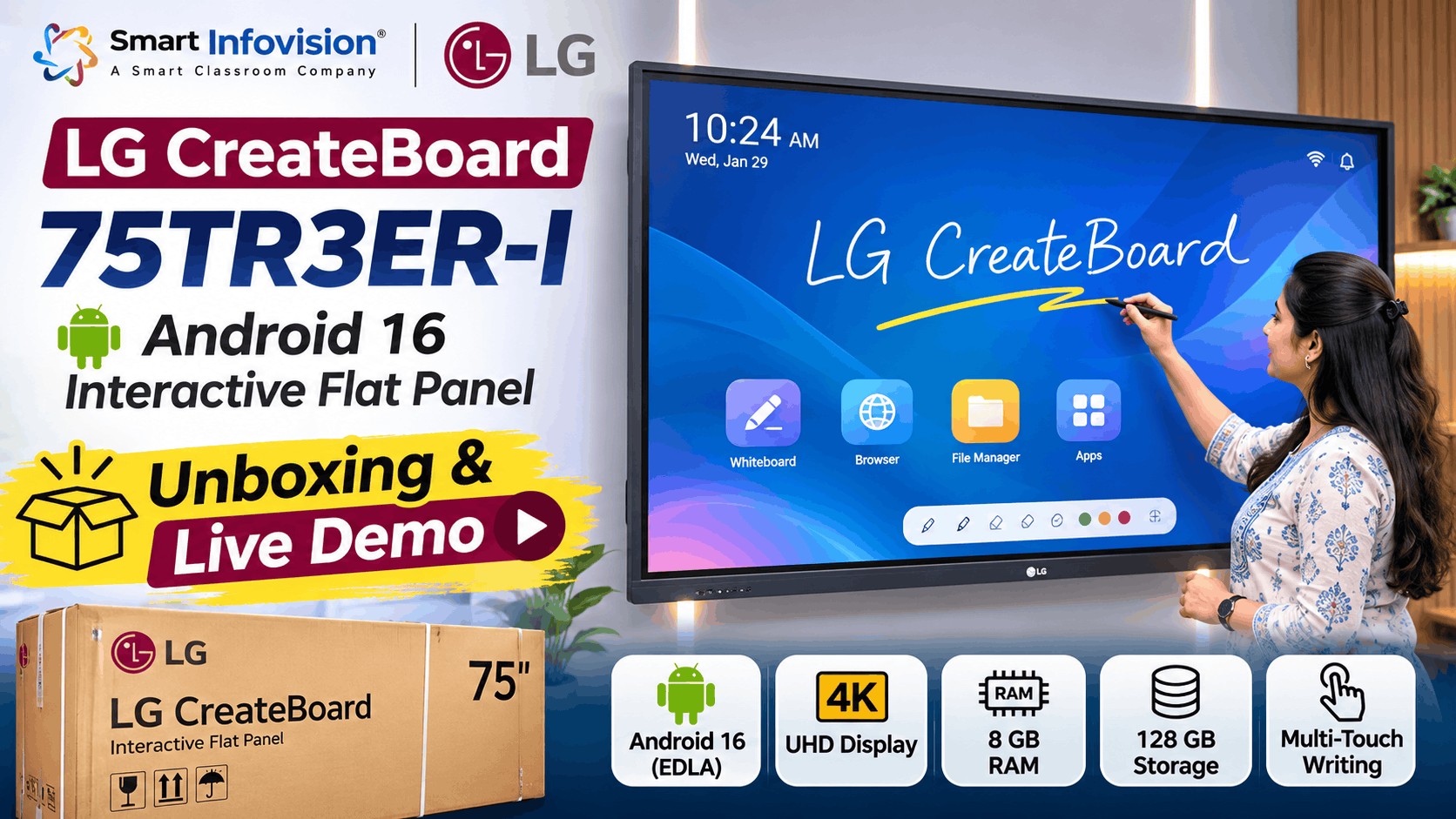
आज स्कूल और कोचिंग संस्थान बड़ी स्क्रीन के साथ ऐसा teaching system चाहते हैं जिस पर लिखना, समझाना और डिजिटल सामग्री दिखाना आसान हो। LG 75TR3ER-I Interactive Flat Panel इसी जरूरत के लिए तैयार 75-inch CreateBoard है। इसमें Android 16, 4K display और interactive whiteboard मिलता है। Smart Infovision ने अपने YouTube चैनल पर इसकी unboxing और demonstration से जुड़ा वीडियो प्रकाशित किया है। यहां manufacturer-confirmed specifications, accessories, teaching tools और installation से जुड़े सवाल समझेंगे। अगर आप classroom upgrade की planning कर रहे हैं, तो खरीदने से पहले किन बातों की जांच जरूरी है, यह भी जानेंगे।
LG 75TR3ER-I की Original Unboxing और Live Demo देखें
LG CreateBoard 75 Inch – क्या है इस मॉडल में खास?
LG CreateBoard 75TR3ER-I एक Interactive Digital Board है, जिसे classroom teaching और presentations के लिए बनाया गया है। इसकी 75-inch स्क्रीन पर PDF notes, diagrams और videos बड़े आकार में दिखते हैं। 4K UHD resolution detailed illustrations को स्पष्ट दिखाने में मदद करता है।
इस मॉडल में Android 16 के साथ Google EDLA certification मिलता है। इससे compatible Google services और Play Store तक पहुंच संभव है। Teachers अपनी जरूरत के educational apps इस्तेमाल कर सकते हैं; Google account और internet की आवश्यकता हो सकती है। अधिक जानकारी के लिए LG CreateBoard TR3ER Interactive Flat Panel page देखें।
Smart Infovision में LG CreateBoard की Live Unboxing
Smart Infovision के प्रकाशित वीडियो का मुख्य विषय LG 75TR3ER-I की unboxing, setup और उपयोग है। बड़े panel की packaging transport के दौरान display और glass को सुरक्षित रखने में मदद करती है। Delivery लेते समय carton, corners और visible damage जांचें।
Panel निकालने के लिए trained team की मदद लें। Screen पर दबाव डालना या एक कोने से उठाना उचित नहीं। Accessories की सूची actual box, invoice और manufacturer listing से मिलाएं।
Box में कौन-कौन सी accessories मिलती हैं?
LG India के अनुसार standard accessories में 1.8-metre power cord, 3-metre HDMI cable, 5-metre USB cable, दो writing pens और remote controller शामिल हैं। Remote के साथ दो batteries सूचीबद्ध हैं। Documentation और warranty records delivery के समय check करें; अलग printed booklet हमेशा मिलने का दावा नहीं किया जा सकता।
HDMI cable से laptop की screen दिखाई जा सकती है। Touch USB compatible computer के साथ interactive control के काम आता है। Stylus pens writing के लिए हैं। Packing list को installation records के साथ सुरक्षित रखें।
LG Android 16 Interactive Flat Panel के Verified Features
नीचे दी गई जानकारी LG India के 75TR3ER-I product specifications पर आधारित है। खरीदते समय model suffix और final quotation से सभी details दोबारा मिलाएं, क्योंकि regional variants में अंतर संभव है।
| Feature | Verified Specification |
|---|---|
| Model | LG CreateBoard 75TR3ER-I |
| Display Size | 75 inch |
| Resolution | 3840 × 2160 (4K UHD) |
| Operating System | Android 16 |
| Google Certification | EDLA |
| RAM | 8 GB |
| Internal Storage | 128 GB |
| Touch | Up to 50 simultaneous points |
| Whiteboard Software | LG CreateBoard Lab |
| Wireless Connectivity | Wi-Fi 6, Bluetooth 5.4 |
Specifications जांचने के लिए LG 75TR3ER-I Official Specifications देखें। Hardware के साथ actual menu response, app loading और writing comfort भी live test करें।
Writing Software और Digital Teaching Experience
Smart classroom में panel का असली इस्तेमाल whiteboard से शुरू होता है। LG CreateBoard Lab में pen, text, shapes, eraser, annotation, table और browser जैसे tools हैं। Teacher formula समझा सकता है, diagram बना सकता है या महत्वपूर्ण हिस्से highlight कर सकता है। यह Mathematics, Science और competitive exam classes में उपयोगी हो सकता है।
Writing में सिर्फ touch points नहीं, pen accuracy, erasing response और handwriting readability देखें। Dual-pen settings, Smart Write या handwriting recognition आपकी जरूरत में हों, तो selected unit पर उनकी availability और performance की पुष्टि करें। बिना परीक्षण इन्हें guaranteed feature न मानें।
दो writing pens से collaborative work आसान हो सकता है, लेकिन हर application में gestures एक जैसे नहीं चलते। Demo में हिंदी लिखें, graphs बनाएं और लंबा paragraph लिखकर देखें। नियमित उपयोग में ऐसी छोटी बातें teaching flow को प्रभावित करती हैं।
Google Apps, Connectivity और Presentation Tools
Android 16 और EDLA के कारण Google ecosystem तक पहुंच मिलती है। Teachers उपलब्ध apps से content प्रस्तुत कर सकते हैं। हालांकि app compatibility, login permissions और institution की security policies पहले जांचनी चाहिए।
LG CreateBoard में Wi-Fi 6, Bluetooth 5.4, HDMI और USB connectivity मिलती है। CreateBoard Share screen sharing में मदद करता है। Picture-in-Picture और Picture-by-Picture अलग source content दिखाने में उपयोगी हो सकते हैं। अधिक technical details के लिए LG CreateBoard Features and Technology देखें।
ऑनलाइन teaching के लिए panel के अलावा camera, microphone, lighting, recording computer और reliable internet चाहिए। इसलिए classroom demo और studio setup को अलग-अलग जांचें। इससे बेकार accessories खरीदने से बचेंगे।
LG CreateBoard Installation और Wall Mounting Process
75-inch display लगाते समय wall strength, mounting height, electrical connection और cables की स्थिति महत्वपूर्ण है। LG की official listing में wall mount तथा floor stand optional हैं। इसलिए mounting kit box के साथ मिलेगी, यह मानकर न चलें।
Installation से पहले authorized service या seller से लिखित पुष्टि लें: mount कौन देगा, technician visit included है या नहीं, wiring charges और warranty claim process क्या है। Setup के बाद screen, touch response, sound, Wi-Fi और ports check करें।
Handover के समय invoice, model number, serial number, accessories और installation acknowledgement सुरक्षित रखें। Classroom में panel की ऊंचाई students और teachers दोनों के अनुकूल होनी चाहिए।
LG CreateBoard vs Benchmark Technomate – किन बातों पर तुलना करें?
दिए गए वीडियो-विषय विवरण में Benchmark Technomate Maxpro Ultra AI और Sigma AI A7 Pro का संदर्भ भी है। लेकिन इनके specifications को LG CreateBoard के features के साथ नहीं मिलाना चाहिए। खासकर Sigma AI A7 Pro के advanced camera का उल्लेख LG 75TR3ER-I में built-in camera होने का प्रमाण नहीं है।
तुलना में एक ही PDF खोलकर writing, app navigation, audio, connectivity और service support जांचें। हर product का interface अलग हो सकता है। सिर्फ RAM या Android version देखकर किसी एक board को सबके लिए बेहतर कहना ठीक नहीं।
LG Interactive Flat Panel Price in India – क्या जानना जरूरी है?
LG 75TR3ER-I की verified current selling price उपलब्ध स्रोतों में स्पष्ट नहीं है। इसलिए यहां कोई अनुमान या discount नहीं दिया गया। Final quote warranty, transport, installation और अतिरिक्त equipment से प्रभावित हो सकता है।
Quotation mangte waqt exact model code, GST, delivery location, installation charges aur included accessories clearly likhwaein. Agar OPS computer, floor stand ya additional cables chahiye, toh unka separate breakup maangein. Isse alag-alag sellers ke offers ko fair tarike se compare kar sakenge.
Smart Infovision Experience Centre पर Live Demo क्यों देखें?
खरीदने से पहले अपनी teaching files के साथ demo लेना उपयोगी है। Smart Infovision digital boards और classroom equipment की product information व consultation उपलब्ध कराता है। Visit या demo appointment पहले confirm करें।
Apni PDF notes aur preferred teaching app saath rakhein. Kuch minutes likhein, erase karein aur screen sharing test karein. Online classes ke liye microphone, PTZ camera aur recording setup ki requirements alag se discuss karein.
विभिन्न panels की जानकारी और supporting documents देखने के लिए Smart Infovision की Interactive Flat Panel Product Brochures library उपयोगी हो सकती है। खरीदारी में सबसे अच्छा फैसला वही है जो वास्तविक teaching routine, budget और service expectations के अनुकूल हो।
Conclusion – क्या LG 75TR3ER-I Teachers के लिए सही है?
LG 75TR3ER-I में 4K display, Android 16 EDLA, 8 GB RAM, 128 GB storage और interactive writing मिलती है। Schools, coaching institutes और training rooms के लिए यह विचार योग्य विकल्प है। फैसला करने से पहले app compatibility, mounting, warranty और live writing test करें।
Agar aap LG CreateBoard kharidne ki planning kar rahe hain, toh Smart Infovision se current quotation aur model-specific consultation maangein. Demo aur classroom checklist ke basis par decision lena behtar rahega.
Frequently Asked Questions
1. LG 75TR3ER-I में कौन-सा Android version मिलता है?
LG India की official listing के अनुसार इस model में Android 16 दिया गया है।
2. Kya LG CreateBoard Google EDLA certified hai?
Haan, manufacturer specification mein Android 16 ke saath EDLA listed hai. Google services ke liye applicable account aur region conditions check karein.
3. LG 75-inch panel के box में क्या मिलता है?
Power cord, HDMI cable, USB cable, दो writing pens और batteries सहित remote controller standard accessories में सूचीबद्ध हैं।
4. LG CreateBoard installation कैसे होता है?
Panel ko suitable wall mount ya compatible stand par trained installation team se fit karwana chahiye. Wall mount optional accessory hai; charges pehle confirm karein.
5. LG 75TR3ER-I की India price कैसे confirm करें?
Exact model, warranty, GST, accessories, delivery aur installation details ke saath Smart Infovision ya authorized seller se current written quotation lein.