Introduction – Nanded Mein Smart Education Ka Naya Adhyay Shuru Hua Smart Infovision Ke Saath
Aaj ke modern education system me technology ek zaroori hissa ban chuki hai.
Classrooms ab sirf padhai ka jagah nahi, balki innovation aur engagement ka center ban gaye hain.
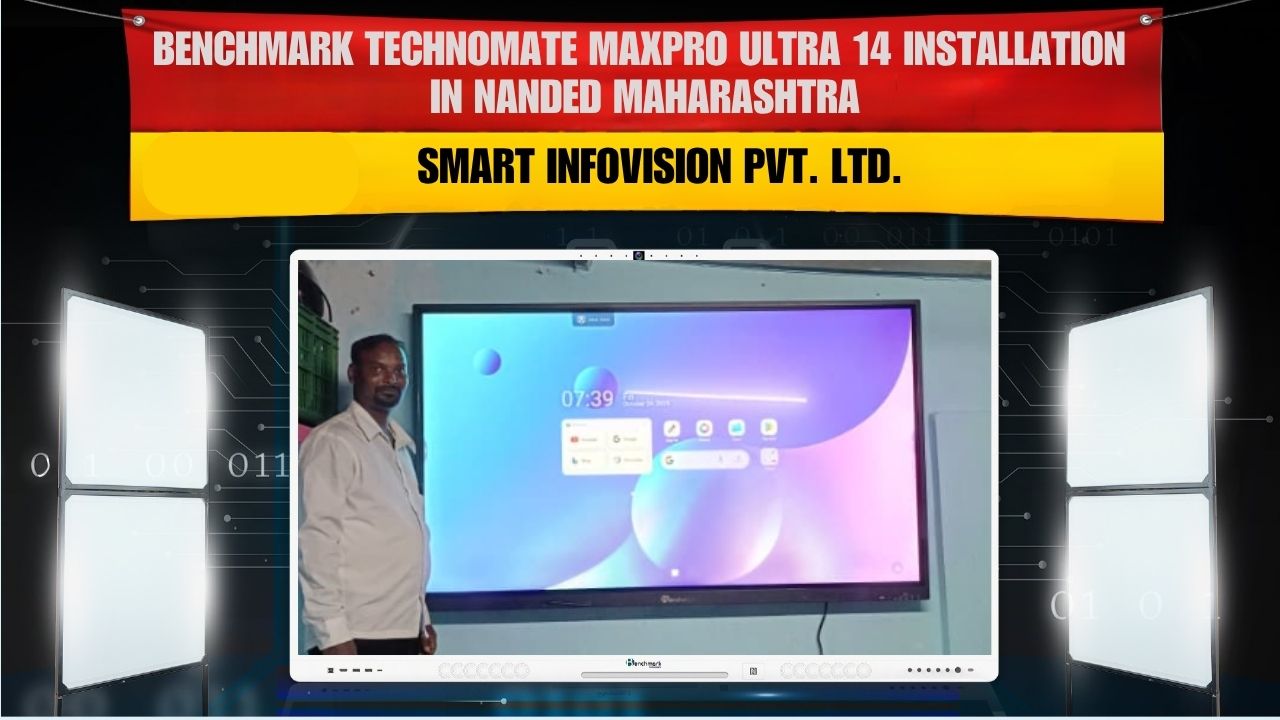
Isi vision ke saath, Smart Infovision ne Nanded, Maharashtra ke ek reputed institution me successfully install kiya
Benchmark MaxPro Ultra 14 (75-inch) interactive flat panel for Mr. Shrikant Laxmanrao Waghmare.
Yeh installation ek aur proof hai ki Smart Infovision poore Bharat me digital learning revolution ko aage badha raha hai.
Benchmark MaxPro Ultra 14 apne advanced Android 14 OS aur 4K clarity ke saath har class ko banata hai super interactive & efficient!
Benchmark MaxPro Ultra 14 (75-inch) – The Power of Smart Learning in One Panel
Benchmark MaxPro Ultra 14 ek premium-grade interactive flat panel hai, specially designed for smart classrooms and professional training rooms.
Is panel ka main goal hai — learning ko engaging, easy aur effective banana.
Aayiye jaante hain iske top features jo isse banate hain best interactive flat panel in Maharashtra

1. Android 14 – The Latest & Fastest Operating System
Benchmark MaxPro Ultra 14 powered hai Android 14 se —
jo speed, performance aur security ke matter me ek naya benchmark set karta hai.
Multitasking ho ya multimedia teaching — panel har situation me fast aur responsive rehta hai.
Aur OTA (Over-the-Air) updates ke saath, system hamesha up-to-date rehta hai.
2. 4K Ultra HD Display – Har Detail Ab Super Clear
Is panel ka 4K UHD display ensure karta hai ki har image aur video crystal-clear quality me dikhe.
Chalkboard ki jagah ab ek bright, dynamic screen — jisse learning hoti hai aur bhi visual aur fun!
3. 20-Point Multi-Touch Support
Interactive sessions ab aur bhi engaging hue hain —
multiple students ek saath board pe likh sakte hain, solve kar sakte hain aur discuss bhi kar sakte hain.
Perfect for group learning and creativity.
4. Dual OS – Android + Windows
Benchmark MaxPro Ultra 14 support karta hai dual operating system (Android 14 + Windows),
jisse flexibility milti hai content aur software use karne me.
Aap chahe school ke smart apps chalao ya office presentation do — sab kuch ek hi screen pe possible hai!
5. Smart Whiteboard & Annotation Tools
Built-in interactive whiteboard tools teachers ko allow karte hain likhne, draw karne aur highlight karne ke liye —
finger ya stylus se, bina kisi marker ke.
Aur sabse best part — likha hua content aap save aur share bhi kar sakte ho.
6. Wireless Connectivity & Screen Mirroring
Teachers aur students apna mobile, laptop ya tablet wirelessly connect kar sakte hain panel ke saath.
Bina cable ke screen share karna ab ek second ka kaam hai!
7. High-Fidelity Dual 40W Speakers
Crystal-clear sound ke liye Benchmark MaxPro Ultra 14 me dual 40W speakers diye gaye hain.
Voice aur video dono clear rehte hain, bina kisi external speaker ke.
8. Anti-Glare & Eye Protection Display
Long study sessions ke dauraan bhi students ki aankhon ka khayal rakha gaya hai.
Panel ka anti-glare aur blue-light filter display ensure karta hai comfortable viewing.
9. Strong Build & Premium Design
75-inch ka sleek aur elegant frame classroom ko ek modern look deta hai.
Smart Infovision ke engineers ne isse precision ke saath wall mount kiya —
safe, strong aur stylish setup ke saath.
10. Screen Recording & Data Sharing
Teachers apni puri class record kar sakte hain aur students ke saath share kar sakte hain.
Perfect for revisions, hybrid learning aur digital archiving.
Installation Story – Nanded Mein Benchmark MaxPro Ultra 14 Ka Smart Setup by Smart Infovision
Mr. Shrikant Laxmanrao Waghmare ke site par Smart Infovision ki expert team ne installation ko ekdum professional style me complete kiya.
Yeh project sirf ek setup nahi, ek learning transformation tha.
Step-by-Step Installation Highlights:
Site Survey & Planning:
Team ne pehle classroom ka layout analyze kiya taaki perfect viewing angle aur lighting mil sake.
Mounting the 75-inch Panel:
Panel ko secure wall brackets ke saath install kiya gaya — ensuring full stability aur clean wire management.
Connectivity & Testing:
Wi-Fi, Android 14 aur dual OS configuration test kiya gaya. Wireless mirroring aur touchscreen responsiveness check hua — flawless result!
Demo & Training:
Installation ke baad Smart Infovision ne Mr. Waghmare aur teaching team ko live demo diya —
kaise panel use karna hai, screen share, annotate aur record karna hai.
Result — ek fully operational smart classroom setup in Nanded, Maharashtra,
ready for next-generation digital learning! 🚀
How Benchmark MaxPro Ultra 14 Transforms Teaching & Learning
Benefits for Teachers:
- Super-fast Android 14 system
- Interactive whiteboard & annotation tools
- Easy lesson recording & sharing
- No projector, no cables – pure digital teaching
- Wireless device connectivity
Benefits for Students:
- Crystal-clear visuals for better understanding
- Real-time interactive sessions
- Eye protection display
- Recorded lessons for self-study
- More engaging, visual, and collaborative learning

Why Smart Infovision is the Most Trusted Smart Classroom Partner in India
Smart Infovision har state me apna excellence prove kar raha hai —
Bihar, U.P., Rajasthan, aur ab Maharashtra me bhi!
Company ka focus hai quality products, professional installation, aur 24×7 service support dena.
Reasons to Choose Smart Infovision:
- Expert installation engineers
- Latest Android 14 smart panels
- Free training for teachers
- 24×7 technical support
- Budget-friendly packages
- Pan-India service reach
- 100% customer satisfaction guarantee
Smart Infovision ka mission hai —
“Technology se education ko aur zyada powerful banana.”
Top 10 FAQs About Benchmark MaxPro Ultra 14 Interactive Flat Panel
1️⃣ What is the screen size of Benchmark MaxPro Ultra 14?
It’s a 75-inch 4K UHD interactive flat panel.
2️⃣ Which Android version does it use?
It runs on the latest Android 14 operating system.
3️⃣ Can it be connected to a Windows PC?
Yes, it supports dual OS (Android + Windows).
4️⃣ Can I use it for online classes?
Absolutely! It supports screen recording, mirroring, and video conferencing.
5️⃣ Does it have in-built speakers?
Yes, dual 40W high-fidelity speakers are integrated.
6️⃣ Is it wall-mounted or mobile?
It’s wall-mounted (custom options available as per client preference).
7️⃣ Can multiple students write together?
Yes, 20-point multi-touch support allows group interaction.
8️⃣ Does it come with warranty and service support?
Yes, Smart Infovision provides full warranty & on-site service.
9️⃣ Is internet connectivity supported?
Yes, both Wi-Fi and Ethernet connectivity options are available.
🔟 Does Smart Infovision provide installation in Maharashtra?
Yes, Smart Infovision offers professional installation & support across Maharashtra.
Conclusion – Nanded Mein Digital Learning Ka Naya Udaan
Smart Infovision ne Mr. Shrikant Laxmanrao Waghmare ke saath milkar Nanded me ek aur successful smart classroom setup complete kiya hai.
Benchmark MaxPro Ultra 14 ke advanced Android 14 system, 4K clarity aur wireless features ne classroom ko ek interactive learning zone me badal diya hai.
Aaj ke students ke liye yeh sirf technology nahi — yeh unke bright future ki taiyaari hai.
Aur is mission ke center me hai ek trusted name — Smart Infovision.
Agar aap bhi apne school, college ya institute me smart classroom setup karwana chahte hain,
toh Smart Infovision hi aapka perfect technology partner hai.
Read More
Discover how Smart Infovision is transforming education across India with next-gen interactive panels and digital classroom solutions.
Visit: www.smartinfovision.com