gital learning and modern presentation setups rapidly grow ho rahe hain, aur organizations ab smart displays adopt kar rahi hain taaki teaching, training, aur meetings zyada professional, fast aur interactive ho jaayein.
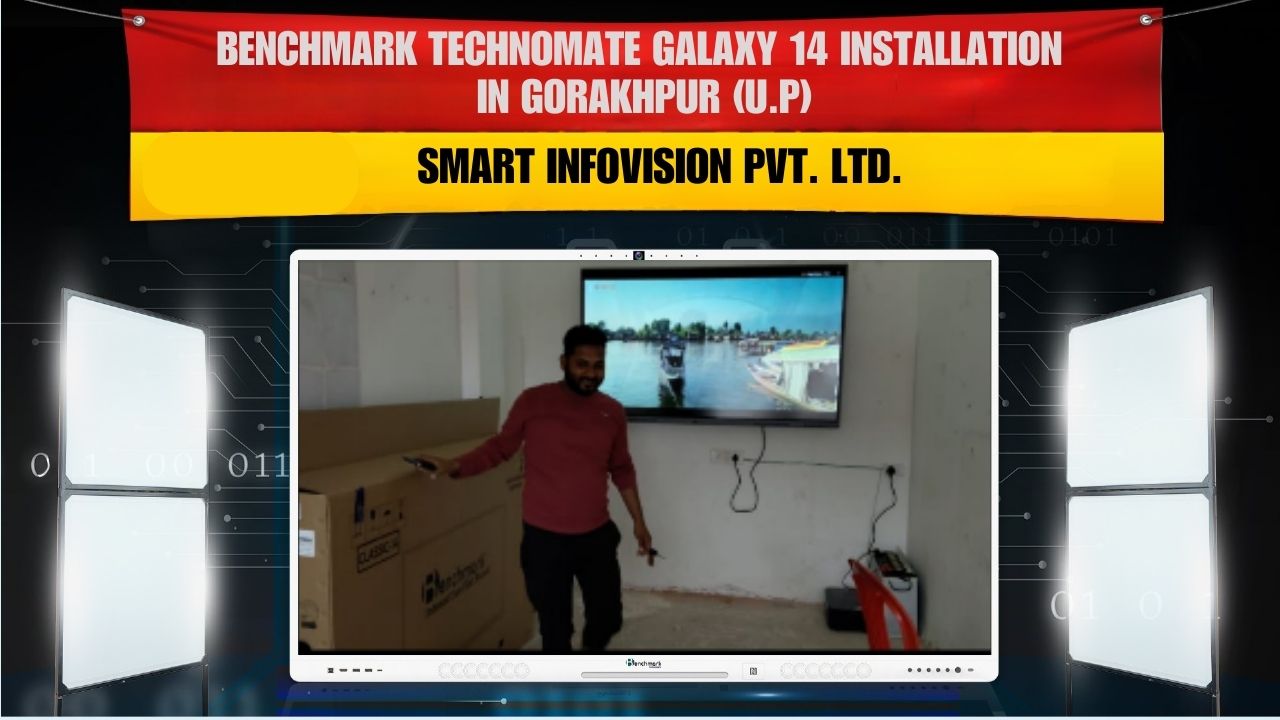
Isi mission ke saath Smart Infovision ne Benchmark Classic 14 (75-inch) Interactive Panel successfully install kiya Gorakhpur, Uttar Pradesh me Hrishikesh Yadav ke premises par.
Yeh installation ek major upgrade laata hai—traditional methodologies se lekar modern digital boardroom and smart classroom experience tak.

Project Details
Client
Hrishikesh Yadav
Location
Gorakhpur, Uttar Pradesh
Product Installed
Benchmark Classic 14 – 75-inch Interactive Flat Panel
Client ko ek modern solution ki need thi jo:
- Projector aur manual writing board replace kare
- Crisp visuals aur lag-free writing provide kare
- Wireless sharing support kare
- Teaching, presentation aur demonstration ko simplify kare
Benchmark Classic 14 ne in sab requirements ko perfectly meet kiya.
Why Benchmark Classic 14 (75-inch)?
75-inch panel classroom, coaching center, meeting room ya training hall ke liye ideal size provide karta hai.
Iske large display se:
- Peeche baithne wale learners ko bhi clear visibility milti hai
- Notes, diagrams aur presentations sharp aur readable rehte hain
- Presenter ka delivery zyada impactful ho jaata hai
Yeh cost-effective aur high-performance solution hai professional setups ke liye.
Top Features of Benchmark Classic 14 (75-inch)
1. 4K Ultra HD Display
Panel ki 4K clarity ensure karti hai:
- Text clearly visible ho
- Images detailed ho
- Graphs, charts aur diagrams crystal clear dikhe
Teaching, business presentation aur content delivery ka overall quality improve ho jaata hai.
2. Real-Time Touch Writing
Panel provide karta hai lag-free writing:
- Digital pen support
- Smooth annotation
- Precise handwriting
- Multi-touch collaboration
Teacher ya presenter bina delay ke likh sakta hai—exactly natural whiteboard feel ke saath.
3. Wireless Screen Mirroring
Multiple devices se:
- Laptop
- Mobile
- Tablet
wireless sharing possible hai—cables ki zaroorat nahi.
Presenter live content share kar sakta hai, students ya participants bhi instant collaboration kar sakte hain.
4. Android OS Built-in
Panel ke built-in Android environment me:
- Apps run ki ja sakti hain
- Notes save kiye ja sakte hain
- Web access possible hai
- Digital whiteboard tools available hote hain
Teaching aur presentation dono easy ho jaate hain.
5. Integrated Audio System
Panel ke high-quality speakers provide karte hain:
- Clear audio delivery
- Videos & tutorials ka better experience
- External speakers ki dependency kam

Smart Infovision Installation Workflow
Smart Infovision ki technical team ne installation systematic process follow karke complete kiya.
Step 1 – Site Inspection
Proper wall height, viewing angle aur audience position check ki gayi.
Step 2 – Mounting & Setup
Panel ko heavy-duty brackets se securely mount kiya gaya.
Step 3 – Cable & Power Management
Wiring ko clean finish ke saath route kiya gaya—professional look ke liye.
Step 4 – System Configuration
Setup include:
- Android configuration
- Network setup
- Wireless sharing enablement
- Display calibration
Step 5 – Live Training & Demonstration
Client ko full walkthrough diya gaya:
- Writing kaise karna hai
- Notes kaise save/share karne hain
- Devices connect kaise karne hain
- Wi-Fi sharing kaise use karna hai
Panel ready-to-use handover kiya gaya.
Benefits After Installation
Is installation ke baad setup me noticeable improvements dekhne ko milte hain:
- Better student/participant engagement
- Faster concept delivery
- Presentation ka professional impact
- Documentation & notes digitally saved
- Modern classroom/meeting experience
Traditional teaching completely smart mode me convert ho gaya.

FAQs
1. Kaunsa model install hua hai?
Benchmark Classic 14 – 75-inch Interactive Panel.
2. Kya yeh projector replace kar sakta hai?
Haan, yeh projector se zyada sharp aur low-maintenance solution hai.
3. Screen resolution kya hai?
4K Ultra HD.
4. Wireless sharing available hai kya?
Haan, multiple devices wireless mirroring kar sakte hain.
5. Touch response kaisa hai?
Lag-free, smooth and natural.
6. Kya Android OS built-in hai?
Haan, panel Android-based operating system ke saath aata hai.
7. Audio ke liye external speakers chahiye?
Nahi, high-quality integrated speakers present hain.
8. Installation all India hota hai kya?
Haan, Smart Infovision PAN India deployment provide karta hai.
9. Training diya jata hai kya?
Haan, installation ke baad proper demonstration aur usage training milti hai.
10. Ideal use cases kya hain?
Smart classrooms, coaching centers, offices, boardrooms, training halls.
Contact Smart Infovision
Service
+91-7090022211
Sales
+91-8527926648
service@smartinfovision.com
sales@smartinfovision.com
Head Office
Smart Infovision, G-128, Sector-63, Noida – 201301