Online Teaching ka New Era
आज का teacher sirf classroom तक limited नहीं रह गया है।
अब हर teacher चाहता है कि:
- Offline class ke sath Online students भी जुड़ें
- Recorded lectures banें
- YouTube / App / Zoom से reach बढ़े
- Coaching ko brand बनाया जाए
Aur ye sab possible hota hai ek perfect Digital Board + Online Teaching Setup se.
Smart Infovision, Bihar & India ke teachers ke liye Benchmark Digital Board ke sath complete online teaching solution provide karta hai.
Is blog me hum step-by-step samjhenge:
Digital Board से Online पढ़ाने का पूरा setup कैसे होता है – from zero to professional level
Step 1: Right Digital Board Choose Karna (Foundation of Online Teaching)
Online teaching ka sabse important part hota hai Interactive Digital Board.
Benchmark Digital Board – Teachers ki First Choice
Smart Infovision teachers ke liye recommend karta hai:
Why Benchmark Digital Board?
✔ 4K Ultra HD Display
✔ Multi-Touch Writing (Finger + Stylus)
✔ Android + Windows Dual OS
✔ Inbuilt Whiteboard Software
✔ Screen Recording Feature
✔ Zoom, Google Meet, OBS compatible
Ye board sirf padhane ke liye nahi, balki online teaching studio ka heart hota hai.
Step 2: Digital Board Installation & Classroom Planning
Smart Infovision ka kaam sirf product dena nahi, balki complete planning hoti hai.
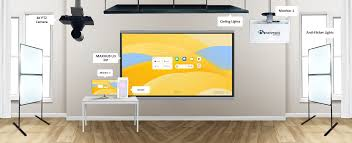
Installation Process:
- Wall Mount / Trolley Mount option
- Eye-level height adjustment
- Board ke angle ka proper calculation
- Classroom size ke according placement
Isse:
✔ Board clear dikhta hai
✔ Camera framing perfect hoti hai
✔ Teacher comfortable feel karta hai
Step 3: Online Teaching ke liye Camera Setup (Most Important)
Agar aap online padhate ho, to normal webcam enough nahi hota.
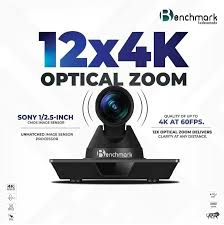
Benchmark 4K PTZ Camera – Professional Solution
Smart Infovision recommend karta hai:
Benchmark 4K PTZ Camera (Wall / Ceiling Mount)
PTZ Camera ke Benefits:
✔ 4K Ultra HD Quality
✔ Auto Tracking Teacher
✔ Board + Teacher dono capture
✔ Zoom & Angle control
✔ Long life professional camera
Is camera se:
- Students ko crystal clear view milta hai
- Class professional lagti hai
- Recording quality next level hoti hai
Step 4: Audio Setup – Mic ka Role Online Teaching me
Video achha ho, lekin audio clear nahi, to class fail ho jati hai.
Smart Infovision Audio Recommendation:
✔ Wireless Collar Mic
✔ Head Mic (Coaching ke liye best)
✔ Noise reduction support
Clear audio ka fayda:
- Students fatigue feel nahi karte
- Recorded video premium lagta hai
- Doubt explanation better hota hai
Step 5: Lighting – Professional Look ke liye Zaroori
Online class me lighting ka role bahut bada hota hai.
Ideal Lighting Setup:
✔ 2×2 LED Ceiling Lights
✔ Shadow free light
✔ White light (no yellow)
Proper lighting se:
- Face clear dikhta hai
- Board reflection kam hota hai
- Video attractive lagta hai
Step 6: System / OPS – Smooth Performance ke liye
Online teaching ke liye lagta hai:
✔ Inbuilt Android (basic use)
✔ OPS / External PC (Advanced use)
Recommended:
- i5 Processor
- 8GB RAM
- SSD Storage
Isse:
- Zoom / OBS smooth chalta hai
- Screen recording lag free hoti hai
- Multiple apps ek sath run hote hain
Step 7: Software Setup – Teaching ko Easy Banana
Smart Infovision teachers ko deta hai complete software guidance.
Commonly Used Software:
✔ Whiteboard Software
✔ Zoom / Google Meet
✔ OBS (Recording + Live)
✔ PDF, PPT Annotation Tools
Training ke baad teacher:
- Digital pen se likh sakta hai
- Notes save kar sakta hai
- Recorded lecture reuse kar sakta hai
Step 8: Recording & Live Streaming Setup
Digital Board se teacher easily:
- Live Zoom Class
- YouTube Live
- App Based Teaching
- Recorded Lecture
kar sakta hai.
Benchmark Board + PTZ Camera recording ko banata hai studio quality ka.
Step 9: Internet & Power Backup
Online teaching ke liye:
✔ Stable Broadband
✔ Minimum 40 Mbps speed
✔ Inverter / UPS backup
Smart Infovision teachers ko ye planning bhi suggest karta hai.
Step 10: Training & After Sales Support (Smart Infovision USP)
Smart Infovision ka biggest plus point hai:
✔ Demo before purchase
✔ Installation ke baad training
✔ Online + Offline support
✔ Teacher friendly approach
Isliye teachers bina fear ke online teaching start kar paate hain.
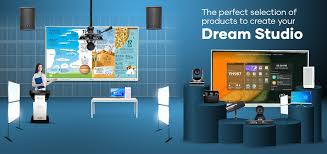
Ek Complete Digital Board Online Teaching Setup me Kya-kya Hota Hai?
✔ Benchmark Interactive Digital Board
✔ Benchmark 4K PTZ Camera
✔ Professional Mic
✔ Lighting Setup
✔ Mounting Accessories
✔ Software Training
One setup – multiple income sources
Teachers ke liye Online Teaching ke Benefits
✔ Offline + Online students
✔ Recorded content reuse
✔ YouTube growth
✔ Brand building
✔ Location independent income
FAQ – People Also Ask
Digital board se online class kaise lete hain?
Digital board ko camera, mic aur internet se connect karke Zoom / Google Meet par online class li ja sakti hai.
Online teaching ke liye best digital board kaunsa hai?
Benchmark Sigma AI A7 aur MaxPro Ultra series teachers ke liye best options hain.
Kya digital board se recording hoti hai?
Haan, Benchmark digital board me inbuilt screen recording feature hota hai.
Online teaching setup ka total cost kitna hota hai?
Approx ₹2.5 lakh se ₹5 lakh tak, setup aur size par depend karta hai.
Kya EMI par digital board setup milta hai?
Haan, Smart Infovision EMI option provide karta hai.
Conclusion – Smart Teaching Starts with Smart Infovision
Aaj ke time me agar aap teacher ho aur online padhana chahte ho, to:
Sirf digital board lena enough nahi, complete setup zaroori hai.
Aur ye complete, tested aur teacher-friendly setup sirf
Smart Infovision + Benchmark Digital Board hi provide karta hai.