Benchmark Digital Board vs Samsung Digital Board: A Comprehensive Comparison
The landscape of digital boards has evolved significantly, with technology transforming how we interact, teach, and present information. In this detailed comparison, we explore the Benchmark Digital Board vs Samsung Digital Board, examining their features, advantages, and distinct functionalities to help you make an informed decision. Whether you are an educator, corporate professional, or tech enthusiast, understanding these differences is crucial.
Digital boards have revolutionized the way we conduct meetings, present ideas, and educate. They offer interactive capabilities, seamless connectivity, and dynamic presentation tools that traditional whiteboards simply cannot match. Among the leading contenders in this space are the Benchmark Digital Board and the Samsung Digital Board. Each offers unique features tailored to different needs and preferences. This article delves deep into their specifications, performance, and user experiences to provide a comprehensive guide.

Benchmark Digital Board Features
Benchmark Digital Board has carved out a niche for itself by focusing on robust performance and user-friendly features. Let’s dive into its key attributes.
User Interface and Ease of Use
The Benchmark Digital Board boasts an intuitive user interface, designed for ease of use. Its touch-responsive screen ensures smooth navigation, making it accessible even for those who are not tech-savvy. The setup process is straightforward, with clear instructions that facilitate quick installation.
Connectivity Options
A standout feature of the Benchmark Digital Board is its extensive connectivity options. It supports HDMI, USB, and wireless connections, allowing seamless integration with various devices. Whether you are connecting a laptop, tablet, or smartphone, this digital board ensures a hassle-free experience.
Display Quality
Display quality is paramount for any digital board, and the Benchmark Digital Board does not disappoint. It features a high-resolution display that delivers sharp, vibrant images and text. This clarity is essential for presentations, ensuring that every detail is visible to the audience.
Interactive Capabilities
Interactive features are at the heart of the Benchmark Digital Board. It supports multi-touch functionality, allowing multiple users to interact with the board simultaneously. This feature is particularly beneficial in educational settings, fostering collaborative learning.
Software Integration
The board comes pre-loaded with a suite of software tools designed to enhance productivity. These include note-taking applications, presentation software, and collaboration tools that facilitate seamless workflow integration.
Durability and Build Quality
Durability is a significant consideration, especially for institutions that plan to use the board extensively. The Benchmark Digital Board is built with high-quality materials, ensuring it can withstand regular use without compromising performance.
Customer Support and Warranty
Reliable customer support and a comprehensive warranty are essential for any tech product. Benchmark offers robust customer support services, including technical assistance and troubleshooting. Additionally, it comes with a warranty that covers manufacturing defects, providing peace of mind to users.
Benchmark Technomate Android 11 Smart Interactive Board With Ultra Smooth And 4k Lcd Display – Maxpro 11 (86inch), Black
Zero gap Bonding technology, low parallax writing and wider viewing angles 4mm anti-glare toughened glass with high haze OC for clearer display against ambient light interference Light-sensitive brightness adjustment and DC dimming support (de-flashing) for a more eye-protection display 4K Ultra HD display ,support full channel 4K UI display | Support for Wireless projection Front USB3.0*3 + on-board USB3.0*1, supports switching with channels.
Alpha- 11
| Latency | Less than 40ms |
| RAM | 4 GB |
| ROM | 32GB |
| Connectivity | LAN / USB 3.0 |
| CPU | Quad Core |
| OS | Android 11 / Windows |
| Features | Dual-tip Stylus supports, Multi-users can write, Dual OS, Type-C Compatibility, Optional-(Intel core-i5, RAM- 8 GB, ROM- 256GB SSD), High-Speed Data Transmission (1000 Mbps), Bezel width <15mm, 3mm glass, Gen1 Zero bonding, 4K UHD |
Max Pro – 11
| Aspect Ratio | 16:09 |
| Power | 240V AC, 50Hz |
| Audio Output | Speaker Type, Built- in Speaker, 32Watt |
| Panel Technology | IPS |
| Wi-Fi connectivity | Yes Dual (5G/2.4G) |
| RAM | 8GB or Higher |
| Environment | Temperature 0-45°C , Humidity 0-95% RH, Power Consumption in Operating Mode(Maximum) 220W |
| Standard Accessories | AC Power Cord, Remote Control, Wall Mount Bracket, stylus(04-Nos.) |
Curved LED Monitor 80cm
| Aspect Ratio | 16:09 |
| Pixel pitch | 0.3637 x 0.3637mm |
| Native resolution | 1920 x 1080 |
| Max.brightness | 250cd/m² |
| Dynamic contrast ratio | 500000:1 |
| Viewing angle | H178/V178 |
| color | 16.7M |
| Response time | 8ms |
| Input | HDMI/VGA |
| Power Consumption | 50 Watts(max) |
I5, 10th Gen , 256GB SSD, 1TB HDD, 2GB Graphic card
Samsung Digital Board Features
Samsung has long been a leader in consumer electronics, and its digital board is no exception. The Samsung Digital Board, often referred to as the Samsung Smart Board, combines cutting-edge technology with user-friendly features.
Design and Aesthetics
Samsung’s attention to design details is evident in its digital board. The sleek, modern design not only looks good but also enhances the overall user experience. The board is designed to be slim and lightweight, making it easy to install in various settings.
High-Resolution Display
One of the standout features of the Samsung Digital Board is its high-resolution display. It offers 4K Ultra HD resolution, ensuring that images and text are incredibly sharp and clear. This level of detail is crucial for professional presentations and detailed visual content.
Advanced Touch Technology
Samsung’s advanced touch technology provides a highly responsive and accurate touch experience. The board supports multi-touch functionality, allowing multiple users to interact with it simultaneously. This feature is perfect for collaborative environments.
Integrated Software Solutions
Samsung Smart Board comes with integrated software solutions that enhance its functionality. These include powerful collaboration tools, cloud connectivity, and seamless integration with other Samsung devices. The software suite is designed to streamline workflows and boost productivity.
Versatile Connectivity
Connectivity is a breeze with the Samsung Digital Board. It offers a variety of connection options, including HDMI, USB, and wireless connectivity. This versatility ensures that the board can easily connect to a wide range of devices, enhancing its usability.
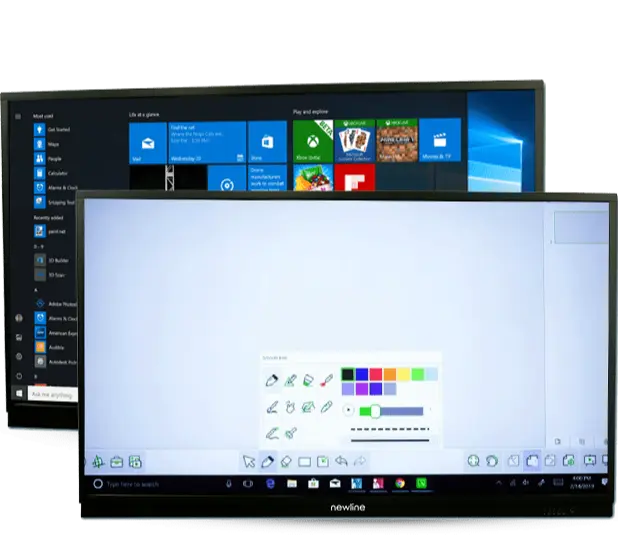
Robust Performance
Performance is a key factor, and the Samsung Digital Board delivers in this area. It is equipped with powerful processors and ample memory, ensuring that it can handle demanding tasks with ease. This reliability is essential for professional and educational settings.
Durability and Support
Samsung’s reputation for quality extends to its digital board. The build quality is excellent, ensuring durability even with regular use. Additionally, Samsung provides comprehensive customer support and a solid warranty, ensuring that users have assistance when needed.
Benchmark Digital Board vs Samsung Digital Board: A Detailed Comparison

To provide a clearer picture, let’s compare the key aspects of the Benchmark Digital Board and the Samsung Digital Board side by side.
User Interface
Both boards offer user-friendly interfaces, but Samsung’s sleek design and advanced touch technology give it a slight edge in terms of aesthetics and responsiveness.
Display Quality
Samsung’s 4K Ultra HD display provides superior clarity and detail compared to the high-resolution display of the Benchmark Digital Board. This makes Samsung the better choice for environments where display quality is paramount.
Interactive Features
Both boards excel in interactive capabilities, supporting multi-touch functionality. However, Samsung’s advanced touch technology offers a more seamless and responsive experience.
Software and Integration
While both boards come with integrated software, Samsung’s suite of collaboration tools and cloud connectivity options are more advanced. This makes it a better choice for users who rely heavily on digital tools and cloud services.
Connectivity
Both boards offer extensive connectivity options, but Samsung’s seamless integration with other Samsung devices provides additional versatility and convenience.
Durability and Build Quality
Both boards are built to last, with high-quality materials ensuring durability. Samsung’s lightweight design, however, makes it easier to install and move.
Customer Support
Both companies offer robust customer support and comprehensive warranties. Samsung’s global presence may provide more extensive support options in some regions.
Samsung Smart Board Features
The Samsung Smart Board stands out for its advanced features designed to enhance productivity and collaboration. Let’s explore these features in detail.
4K Ultra HD Display
The 4K Ultra HD display ensures that content is displayed with incredible clarity. This is particularly beneficial for presentations that include detailed visuals, such as graphs and images.
Advanced Collaboration Tools
Samsung Smart Board comes with a suite of collaboration tools that facilitate seamless teamwork. These tools include real-time editing, cloud connectivity, and easy sharing options.
Intuitive User Interface
The user interface is designed to be intuitive and user-friendly, making it easy for users to navigate and utilize the board’s features effectively. The touch screen is highly responsive, ensuring smooth interaction.
Enhanced Connectivity
Connectivity options include HDMI, USB, and wireless connections, allowing the board to connect with a wide range of devices. This versatility enhances its usability in various settings.
Integrated Security Features
Security is a critical consideration, especially in professional environments. The Samsung Smart Board includes integrated security features that protect data and ensure privacy during collaborative sessions.
Customizable Settings
The board offers customizable settings, allowing users to tailor the interface and functionality to their specific needs. This flexibility is ideal for different use cases, from educational settings to corporate environments.
Durable Build
The build quality of the Samsung Smart Board ensures that it can withstand regular use. Its sleek and modern design also makes it an attractive addition to any room.
Comprehensive Support
Samsung provides extensive customer support, including technical assistance and troubleshooting. The board also comes with a comprehensive warranty that covers manufacturing defects.
Read Also – Low Cost Digital Board Price For Teaching
Choosing Between Benchmark Digital Board and Samsung Digital Board
When deciding between the Benchmark Digital Board and the Samsung Digital Board, several factors need to be considered. These include the specific use case, budget, and desired features. Both boards offer robust performance and a range of features, but the choice ultimately depends on individual needs and preferences.
Educational Settings
For educational settings, both boards offer excellent interactive features that enhance learning. However, Samsung’s advanced touch technology and higher display resolution may provide a better experience for students and educators.
Corporate Environments
In corporate environments, the choice may come down to the level of integration with other devices and software. Samsung’s seamless integration with its ecosystem and advanced collaboration tools make it a strong contender for businesses looking to enhance productivity.
Budget Considerations
Budget is always a crucial factor. Benchmark Digital Board offers a range of features at a competitive price, making it an attractive option for those with budget constraints. Samsung’s advanced features may come at a higher cost, but the investment could be justified by the enhanced performance and capabilities.
User Preferences
User preferences and familiarity with the brand can also play a role in the decision-making process. Those already using Samsung devices may find the Samsung Digital Board’s integration features particularly appealing.
Detailed Comparison Table: Benchmark Digital Board vs Samsung Digital Board
| Feature | Benchmark Digital Board | Samsung Digital Board |
|---|---|---|
| Display Quality | High-resolution display, clear and vibrant images | 4K Ultra HD display, superior clarity and detail |
| Touch Technology | Multi-touch functionality | Advanced multi-touch technology, highly responsive |
| User Interface | Intuitive and user-friendly | Intuitive, sleek design with advanced touch capabilities |
| Connectivity Options | HDMI, USB, and wireless connections | HDMI, USB, wireless, seamless integration with Samsung devices |
| Interactive Features | Supports multi-user interaction | Supports multi-user interaction, enhanced collaboration tools |
| Software Integration | Pre-loaded with note-taking, presentation software | Integrated with powerful collaboration tools and cloud connectivity |
| Durability and Build Quality | High-quality materials, robust and durable | Sleek, modern design, lightweight yet durable |
| Customer Support | Comprehensive support, technical assistance | Extensive support, global presence, technical assistance |
| Warranty | Comprehensive warranty covering manufacturing defects | Comprehensive warranty covering manufacturing defects |
| Price | Cost-effective, competitive pricing | Higher price point, justified by advanced features |
| Ideal for | Educational and budget-conscious users | Corporate environments and tech-savvy users |
| Security Features | Standard security features | Integrated security features for data protection |
| Customizable Settings | Basic customization options | Extensive customization options for user-specific needs |
| Performance | Reliable performance for regular tasks | High performance with powerful processors and ample memory |
| Setup and Installation | Easy to set up with clear instructions | Easy to install, lightweight design |
| Design Aesthetics | Functional and user-friendly design | Sleek, modern design enhancing overall user experience |
| Cloud Connectivity | Limited cloud connectivity | Extensive cloud connectivity for real-time collaboration |
| Collaboration Tools | Basic collaboration tools | Advanced real-time editing and sharing tools |
| Educational Use | Suitable with strong interactive features | Superior touch technology and display for enhanced learning |
| Corporate Use | Effective for presentations and meetings | Advanced features for enhanced productivity and collaboration |
| Integration with Devices | Compatible with various devices | Seamless integration with other Samsung devices |
This comparison table highlights the key differences and advantages of the Benchmark Digital Board and the Samsung Digital Board. Each board offers unique features tailored to different user needs, making it easier to choose the right one based on specific requirements.
Conclusion
The choice between the Benchmark Digital Board vs Samsung Digital Board ultimately depends on your specific needs and preferences. Both boards offer robust features and excellent performance, but they cater to slightly different markets. Benchmark Digital Board is an excellent choice for those looking for a cost-effective, user-friendly option with strong interactive capabilities. On the other hand, Samsung Digital Board excels with its advanced features, superior display quality, and seamless integration with other devices.
By understanding the key differences and advantages of each board, you can make an informed decision that best suits your requirements. Whether you are enhancing a classroom, equipping a conference room, or upgrading your presentation tools, both boards offer valuable solutions that can significantly improve your workflow and productivity.
FAQs
What is the main difference between the Benchmark Digital Board and the Samsung Digital Board?
The main difference lies in the display quality, touch technology, and integrated software. Samsung offers a 4K Ultra HD display and advanced touch technology, while Benchmark focuses on cost-effective, user-friendly features.
Which board is better for educational purposes?
Both boards are suitable for educational purposes, but Samsung’s advanced touch technology and higher resolution display may offer a better experience for interactive learning.
Is the Samsung Digital Board compatible with other Samsung devices?
Yes, the Samsung Digital Board seamlessly integrates with other Samsung devices, providing a cohesive and efficient user experience.
Does the Benchmark Digital Board support multi-touch functionality?
Yes, the Benchmark Digital Board supports multi-touch functionality, allowing multiple users to interact with the board simultaneously.
What are the connectivity options available for these digital boards?
Both boards offer a variety of connectivity options, including HDMI, USB, and wireless connections, ensuring compatibility with a wide range of devices.
Which board offers better customer support and warranty?
Both companies offer robust customer support and comprehensive warranties. Samsung’s global presence may provide more extensive support options in some regions.