आज online education में केवल अच्छा पढ़ाना काफी नहीं है। अगर आपकी knowledge बेहतरीन है लेकिन video blur है, आवाज़ साफ नहीं आती, Digital Board पर लिखा हुआ ठीक से दिखाई नहीं देता या lighting की वजह से चेहरा और board overexposed दिखता है, तो student का learning experience प्रभावित हो सकता है।
यही कारण है कि आज teachers, coaching institutes और educational creators Professional Teaching Studio Setup को केवल “YouTube setup” की तरह नहीं, बल्कि अपने digital education infrastructure की तरह देख रहे हैं।
Sachin Rana जैसे educators के digital teaching content को देखकर एक बात समझ आती है—online teaching में subject expertise के साथ presentation, visibility, audio clarity और structured digital delivery भी महत्वपूर्ण हैं। उनके verified YouTube channel पर Organic Chemistry जैसे subjects पर detailed educational videos उपलब्ध हैं।
लेकिन इसका अर्थ यह नहीं है कि आपको किसी educator का exact studio copy करना है।
सही approach यह है:
उनके जैसे professional teaching experience से inspiration लें और अपने subject, room, budget, audience तथा teaching style के हिसाब से studio बनाएं।
इस detailed guide में हम समझेंगे कि एक professional educator studio में Camera, Microphone, Lighting, Digital Board, Interactive Flat Panel, AI/PTZ Camera, OBS, Audio, LMS, Branding और Hybrid Teaching infrastructure कैसे plan किया जा सकता है।
Quick Answer: Professional Teaching Studio Setup में क्या-क्या चाहिए?
अगर आप जल्दी answer चाहते हैं, तो एक complete teaching studio में सामान्यतः ये core components होते हैं:
- Interactive Flat Panel या Digital Board
- 1080p/4K Camera या PTZ Camera
- Wireless/Professional Microphone
- Anti-flicker Studio Lighting
- Recording/Streaming Computer या OPS
- OBS या अन्य recording software
- Stable Internet Connection
- Acoustic treatment जहाँ आवश्यक हो
- Monitoring Display
- LMS या course delivery platform
- Branded background
- Proper cabling, mounting और power management
Smart Infovision अपने official platform पर Digital Boards, cameras, microphones, lighting और complete teaching/recording studio infrastructure उपलब्ध कराने की जानकारी देता है।
भारत का Education Market अब केवल Classroom तक सीमित नहीं है
भारत में education तेजी से digital और hybrid direction में आगे बढ़ रहा है।
आज एक teacher का classroom केवल वह कमरा नहीं है जहाँ 50 या 100 students बैठे हों। एक अच्छी recording एक ही समय में हजारों learners तक पहुँच सकती है। Recorded courses, YouTube lectures, live batches, test-preparation platforms और hybrid classrooms ने teaching की geographical boundaries कम कर दी हैं।
IBEF की May 2026 education industry report के अनुसार, भारत का education market FY30 तक लगभग US$313 billion तक पहुँचने का अनुमान है। उसी report में digital education market के 2025–2030 के दौरान 24% CAGR से बढ़ने का अनुमान दिया गया है।
Ministry of Education की technology-enabled learning initiatives भी यह दिखाती हैं कि digital platforms formal और competitive education ecosystem का महत्वपूर्ण हिस्सा बन चुके हैं।
इस बदलाव का सीधा मतलब educators के लिए है:
अब आपकी teaching quality के साथ आपकी digital delivery quality भी आपकी पहचान बन रही है।
Problem Analysis: अच्छे Teacher का Online Video कमजोर क्यों लग सकता है?
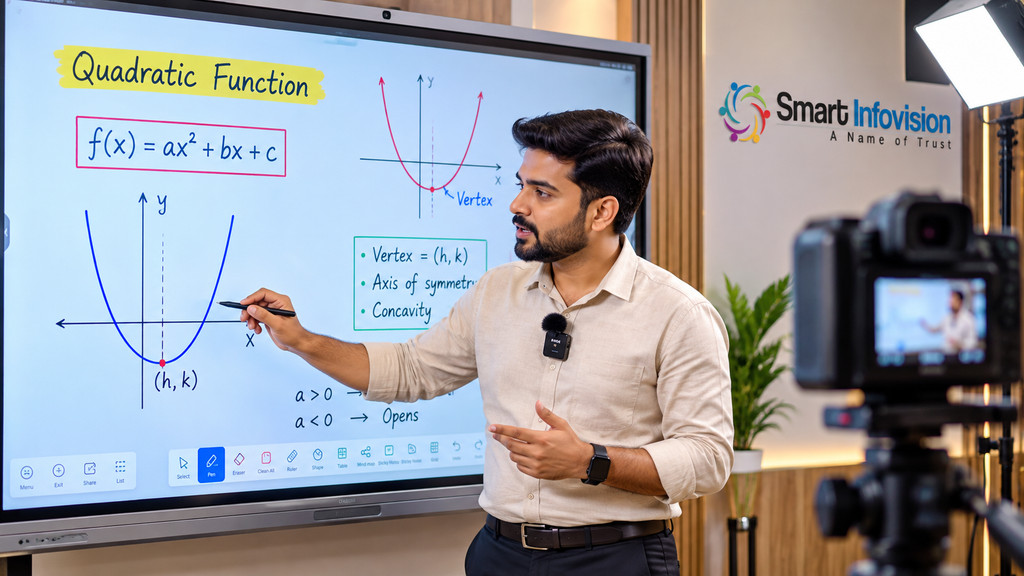
मान लीजिए एक Chemistry teacher के पास 15 वर्षों का experience है।
वह classroom में शानदार पढ़ाते हैं।
लेकिन YouTube lecture record करते समय:
camera बहुत दूर है,
board पर reflection है,
mic में echo आ रहा है,
teacher frame से बाहर जा रहे हैं,
छोटा text mobile पर readable नहीं है,
और lighting के कारण board washed-out दिखाई दे रहा है।
क्या teaching knowledge खराब है?
नहीं।
Problem knowledge में नहीं, presentation infrastructure में है।
Online student classroom में बैठकर teacher को directly नहीं देखता। उसके और teacher के बीच camera, microphone, display, internet और screen होती है।
इसलिए online education में technology केवल accessory नहीं है।
यह teacher और student के बीच communication bridge है।
Why Traditional Teaching is Changing
Traditional classroom में teacher chalkboard या whiteboard पर लिखता था और सामने बैठे students तुरंत interaction कर सकते थे।
आज वही lecture कई formats में deliver किया जा सकता है:
- Physical classroom
- YouTube video
- Recorded course
- Live Zoom/Meet class
- Mobile learning application
- LMS
- Hybrid classroom
- Short-form educational content
- Paid online batch
यानी एक lecture अब एक single-use activity नहीं है।
सही infrastructure के साथ एक lecture:
Teach → Record → Edit → Upload → Reuse → Repurpose
workflow का हिस्सा बन सकता है।
एक 60-minute lecture से full YouTube video, course lesson, revision clip, Shorts/Reels, PDF notes और doubt-solving content बनाया जा सकता है।
यही modern education content ecosystem है।
Technology Gap: महंगे उपकरण होने के बाद भी Studio Professional क्यों नहीं लगता?
Studio planning में सबसे common mistake है:
Equipment पहले खरीद लिया जाता है, workflow बाद में सोचा जाता है।
किसी ने 4K camera खरीद लिया लेकिन lighting खराब है।
किसी ने expensive microphone खरीदा लेकिन room में echo बहुत है।
किसी ने 86-inch Digital Board खरीद लिया लेकिन camera framing गलत है।
किसी ने पूरा studio बनाया लेकिन OBS scenes, audio levels और recording workflow configure नहीं किया।
इसलिए studio setup का सही प्रश्न यह नहीं है:
“सबसे महंगा camera कौन-सा है?”
सही प्रश्न है:
“मेरी teaching workflow के लिए camera, audio, lighting, board और software एक साथ कैसे काम करेंगे?”
Solution: पहले Teaching Workflow Design करें
Professional Teaching Studio Setup बनाने से पहले पाँच सवाल पूछें:
1. आप क्या पढ़ाते हैं?
Mathematics, Physics और Chemistry में board visibility बहुत महत्वपूर्ण हो सकती है।
Language teaching में face communication और audio clarity अधिक important हो सकती है।
Podcast/interview content में microphone और multi-camera framing महत्वपूर्ण हो सकते हैं।
2. Content live होगा या recorded?
Live classes में reliable connectivity, real-time switching और monitoring महत्वपूर्ण हैं।
Recorded classes में post-production flexibility अधिक होती है।
3. Teacher कितना move करता है?
अगर teacher Digital Board के सामने लगातार move करता है, PTZ या suitable wide framing वाला camera useful हो सकता है।
4. Audience कहाँ देखेगी?
अगर majority audience mobile पर है तो board text बड़ा और high-contrast होना चाहिए।
5. Future expansion क्या है?
आज single-teacher setup हो सकता है।
कल वही setup:
- Online batches
- YouTube
- Recorded courses
- Podcasts
- Guest lectures
- Hybrid classroom
के लिए उपयोग हो सकता है।
इसलिए शुरुआत से scalable infrastructure plan करना बेहतर है।
Smart Infovision Approach: Product नहीं, Complete Workflow देखें
एक professional studio में अलग-अलग devices खरीदना आसान है।
लेकिन सबसे बड़ी चुनौती integration है।
Camera कहाँ mount होगा?
Digital Board की height क्या होगी?
Lights किस angle पर लगेंगी?
Microphone receiver कहाँ रहेगा?
OBS किस system पर चलेगा?
Camera और computer कैसे connect होंगे?
Teacher live comments कहाँ देखेगा?
Cables दिखाई तो नहीं देंगी?
Room में echo तो नहीं आएगा?
इसीलिए complete studio planning useful होती है।
Smart Infovision Studio Setup Solutions पर Virtual Class Studio, Green Chroma Studio, Hybrid Class Studio, Acoustic Studio और Online Class Studio जैसे configurations listed हैं।
Smart Infovision की current website Digital Board, camera, audio, lighting, installation और training को integrated studio solution के हिस्से के रूप में प्रस्तुत करती है।
Experience Center क्यों महत्वपूर्ण है?
Online specifications देखकर Digital Board या camera खरीदना और उसे real teaching environment में experience करना दो अलग बातें हैं।
एक Experience Center में educator practical तौर पर check कर सकता है:
- Board पर writing latency कैसी लगती है?
- Camera में board readable है या नहीं?
- Teacher full frame में आता है?
- Lighting में glare तो नहीं बन रहा?
- Mic की आवाज़ कैसी है?
- PTZ movement practical है?
- OBS workflow कितना आसान है?
- 65, 75 और 86-inch panel में कौन-सा suitable है?
- Studio में standing distance कितनी चाहिए?
Smart Infovision अपने network में multiple Experience Centers list करता है, जहाँ studio और digital teaching infrastructure को live देखने की सुविधा बताई गई है।
Mid-Blog CTA
Studio equipment online देखकर decide करने से पहले live demo लें।
अपने room size, teaching subject, budget और online/offline workflow के आधार पर Digital Board + Camera + Mic + Lighting configuration compare करें।
Smart Infovision से Free Studio Consultation लें
Product Ecosystem: Complete Teaching Studio कैसे बनता है?
एक professional studio को individual gadgets की list की तरह नहीं, ecosystem की तरह देखें।
Core ecosystem:
Display + Camera + Audio + Lighting + Processing + Recording + Delivery
अब हर component को detail में समझते हैं।
Camera Setup: Professional Teaching Studio के लिए कौन-सा Camera चाहिए?
Camera student की “आँख” है।
इसलिए केवल resolution देखकर camera select करना सही approach नहीं है।
1080p या 4K?
Normal online classes के लिए good-quality 1080p भी पर्याप्त हो सकता है।
लेकिन 4K camera का फायदा तब मिलता है जब:
- बड़े Digital Board को capture करना हो
- Post-production crop करना हो
- Premium recorded courses बनाना हो
- Multiple framing options चाहिए
- Future-proof setup चाहिए
YouTube की official recommendations में 1080p और 2160p/4K दोनों supported workflows दिए गए हैं। Standard-frame-rate SDR content के लिए YouTube 1080p पर 8 Mbps और 4K पर 35–45 Mbps recommended video bitrate बताता है।
PTZ Camera क्यों useful है?
PTZ का अर्थ है:
Pan – Tilt – Zoom
Teaching studio में PTZ Camera useful हो सकता है क्योंकि teacher board के अलग-अलग हिस्सों पर move करता है।
Proper PTZ setup से:
- Teacher tracking आसान हो सकती है
- Wide और close framing मिल सकती है
- Camera ceiling/wall mount किया जा सकता है
- Operator dependency कम हो सकती है
- Preset positions बनाई जा सकती हैं
Smart Infovision अपने studio solutions में 4K PTZ camera configurations list करता है।
Image Suggestion
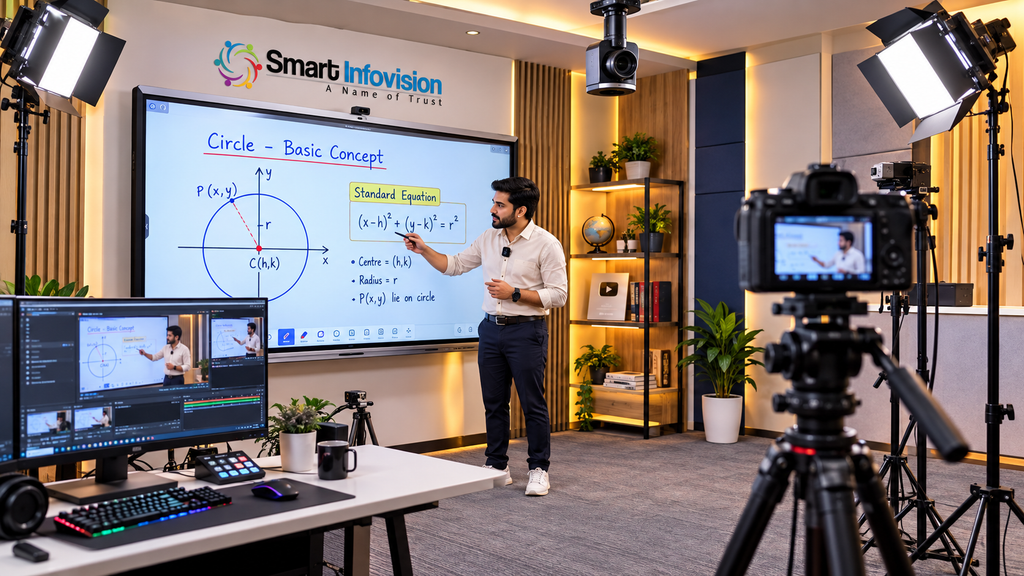
Image: Teacher Digital Board के सामने पढ़ाते हुए, सामने ceiling-mounted PTZ camera.
Alt Text: Professional Teaching Studio Setup with 4K PTZ Camera and Digital Board
Sachin Rana जैसे Educational Content से क्या सीख सकते हैं?
किसी successful educator की exact equipment list copy करने से ज्यादा useful है उनके content presentation को observe करना।
Sachin Rana के verified YouTube educational content में long-form Organic Chemistry teaching videos उपलब्ध हैं।
ऐसे educational videos देखते समय equipment brand खोजने के बजाय ये चीजें observe करें:
- Teacher visibility
- Board/content readability
- Audio consistency
- Framing
- Teaching pace
- Visual distractions
- Content structure
- Recording continuity
यही factors student experience पर वास्तविक प्रभाव डालते हैं।
Recommended Video Reference
इस तरह के lecture को देखकर यह analyse करें कि long-form educational content में visual clarity और uninterrupted explanation क्यों महत्वपूर्ण है।
Microphone Setup: Camera से पहले Audio पर ध्यान क्यों दें?
कई नए creators पहले camera पर budget खर्च करते हैं।
लेकिन educational content में खराब audio, average video से अधिक distracting हो सकता है।
Student lecture सुन रहा है।
अगर आवाज़:
- दूर से आए
- echo करे
- fan noise capture करे
- कभी तेज़ और कभी धीमी हो
- clipping करे
तो concentration टूटती है।
Teaching Studio के लिए Microphone Options
Wireless Lavalier / Collar Mic
Standing teacher के लिए convenient।
Benefits:
- Teacher freely move कर सकता है
- Mouth से distance relatively consistent रहती है
- Board teaching के लिए practical
Headset Microphone
Movement-heavy classes के लिए useful।
Mic mouth के पास रहता है, इसलिए voice consistency अच्छी हो सकती है।
Podcast / Condenser Microphone
Desk-based recording, podcast और talking-head content के लिए suitable हो सकता है।
लेकिन untreated room में sensitive microphone unwanted room sound भी capture कर सकता है।
Audio का Golden Rule
Mic को speaker के जितना practical हो उतना करीब रखें।
Expensive mic + खराब placement की तुलना में reasonable mic + सही placement अक्सर बेहतर result दे सकता है।
Smart Infovision की current product listing में wireless और podcast microphones दोनों categories उपलब्ध हैं।
Image Suggestion
Image: Educator Digital Board के सामने wireless collar microphone के साथ.
Alt Text: Wireless Microphone for Professional Online Teaching Studio Setup
Lighting Setup: Digital Board के सामने सबसे मुश्किल हिस्सा
Normal YouTube studio और Digital Board teaching studio में बड़ा अंतर lighting का है।
Talking-head creator को केवल face light करना होता है।
Digital Board educator को simultaneously:
- Teacher
- Digital Board
- Background
तीनों balance करने होते हैं।
गलत light placement से board पर reflection दिखाई दे सकता है।
Key Light
Teacher के चेहरे की primary illumination।
इसे camera axis से थोड़ा side पर रखा जा सकता है।
Fill Light
Face पर बनने वाली harsh shadow कम करती है।
Background Light
Teacher को background से visually separate करती है।
Board Lighting
Digital Board स्वयं illuminated होता है, इसलिए उसके सामने unnecessary direct light डालना glare बढ़ा सकता है।
इसलिए professional studio planning में camera exposure और board brightness को lighting के साथ test करना चाहिए।
Anti-Flicker Lighting
Recording studio में lights camera shutter/frame rate के साथ flicker create कर सकती हैं।
इसलिए video-oriented anti-flicker lights useful हो सकती हैं।
Smart Infovision अपने product ecosystem में BMT Anti Flicker Light list करता है।
Image Suggestion
Image: Wide-angle professional studio showing teacher, Digital Board, key light, fill light और camera.
Alt Text: Professional Studio Lighting Setup for Online Teachers and Digital Board Recording
Interactive Flat Panel: Modern Teacher का Digital Canvas
Traditional board information display करता है।
Interactive Flat Panel teacher को content के साथ interact करने देता है।
एक modern IFP में use-case के आधार पर features हो सकते हैं:
- Touch writing
- Annotation
- PDF teaching
- PPT presentation
- Screen mirroring
- Multimedia
- Browser
- Whiteboard tools
- Windows via OPS
- Android environment
- Multiple touch points
Smart Infovision की product page Digital Board/Interactive Flat Panel configurations में 65, 75 और 86-inch sizes, 4K display, Android platform, multi-touch और optional OPS जैसी capabilities list करती है।
कौन-सा Size चुनें?
65-inch
छोटे room, personal studio या limited viewing distance के लिए।
75-inch
Professional teaching studio और medium classroom के लिए common balanced option हो सकता है।
86-inch
Large classroom, institute या wider viewing distance के लिए useful हो सकता है।
लेकिन size अकेला decision factor नहीं है।
Room depth, camera framing और teacher movement भी consider करें।
Digital Board और Interactive Flat Panel में क्या Difference है?
Market में “Digital Board”, “Smart Board” और “Interactive Flat Panel” terms कई बार interchangeably इस्तेमाल होते हैं।
Practical buying के समय terminology से ज्यादा specifications देखें:
- Display resolution
- Touch technology
- OS
- RAM/storage
- OPS compatibility
- Speakers
- Connectivity
- Warranty
- Installation
- Software
- After-sales support
सिर्फ “AI Digital Board” label देखकर purchase न करें।
पूछें:
AI वास्तव में क्या करता है?
AI Teaching: AI केवल Marketing Word नहीं होना चाहिए
AI-enabled teaching infrastructure का उद्देश्य teacher को replace करना नहीं, repetitive tasks और production workflow को आसान बनाना होना चाहिए।
AI applications में शामिल हो सकते हैं:
- Automatic captions
- Transcription
- Lecture summaries
- Question generation
- Content organization
- Searchable lecture library
- Camera tracking
- Noise reduction
- Translation assistance
- Student analytics
लेकिन technology तभी useful है जब teacher का workflow सरल हो।
अगर AI feature use करने के लिए हर lecture से पहले 20 मिनट configuration करनी पड़े, तो practical value कम हो सकती है।
इसलिए AI product खरीदते समय demo में real workflow test करें।
AI Camera और Auto Tracking
Traditional camera static frame देता है।
AI-enabled tracking camera teacher movement को detect करके framing adjust कर सकता है।
यह विशेष रूप से useful हो सकता है:
- Large Digital Board teaching
- Hybrid classroom
- Lecture hall
- Solo educator recording
- Coaching studio
लेकिन auto tracking का demo लेना जरूरी है।
Check करें:
- Movement smooth है?
- Tracking delay कितना है?
- Teacher और board दोनों frame में रहते हैं?
- Multiple people होने पर tracking confuse तो नहीं होती?
- Presets available हैं?
Hybrid Classroom: एक Teacher, दो Audiences
Hybrid classroom में teacher के सामने physical students भी होते हैं और online students भी।
यहीं setup complexity बढ़ती है।
Physical student teacher को naturally देख सकता है।
Online student केवल वही देखता है जो camera दिखाता है।
इसलिए hybrid setup में तीन experiences align होने चाहिए:
Teacher Experience + Physical Student Experience + Online Student Experience
Ideal hybrid infrastructure में आवश्यकता के अनुसार हो सकते हैं:
- Interactive Flat Panel
- PTZ Camera
- Wireless Microphone
- Speakers
- Monitoring Screen
- Recording PC/OPS
- Stable broadband
- UPS/Power backup
- LMS integration
Smart Infovision Hybrid Class Studio Setup को अपने studio solution categories में list करता है।
Recording Setup: OBS Studio की भूमिका
Hardware होने के बाद recording software workflow आता है।
OBS Studio educators और creators के लिए widely used recording/streaming software है।
Official OBS guide के अनुसार basic setup में Auto-Configuration Wizard run करना, sources add करना, audio configure करना और actual session से पहले test recording करना शामिल है।
OBS में आप sources add कर सकते हैं जैसे:
- Camera
- Screen
- Presentation
- Digital Board output
- Images
- Media
- Microphone
- Capture card
Educator के लिए Useful OBS Scenes
Scene 1 – Full Teacher + Board
Normal explanation.
Scene 2 – Full Board
Equation, diagram या detailed concept.
Scene 3 – Teacher + Presentation
Theory या revision.
Scene 4 – Screen Share
Website/software demonstration.
Scene 5 – Teacher Close-up
Introduction, conclusion या important explanation.
Practical Tip
पहली real class पर experiment मत करें।
OBS भी actual session से पहले short test recording की सलाह देता है।
OBS Studio Official Quick Start Guide
Recording Quality: 1080p या 4K?
हर educator को 4K में record करना जरूरी नहीं है।
1080p चुनें जब:
- Daily lectures ज्यादा हों
- Storage limited हो
- Editing system moderate हो
- Upload speed limited हो
- Board readability 1080p में पर्याप्त हो
4K चुनें जब:
- Premium course बना रहे हों
- Post-production crop चाहिए
- Large board details important हों
- Long-term reusable content बनाना हो
- Storage और editing infrastructure available हो
YouTube की official encoding guidance recording source के frame rate को upload में preserve करने और common frame rates जैसे 24, 25, 30, 48, 50 और 60 fps को support करने की सलाह देती है।
YouTube Video Reference: Long-Form Teaching Structure
Educational creator को ऐसे videos से यह सीखना चाहिए कि long-form teaching में technology background में रहनी चाहिए और subject foreground में।
Student को camera, light या microphone notice नहीं करना चाहिए।
उसे concept समझ आना चाहिए।
यही successful studio का लक्ष्य है।
LMS: Recording के बाद Content कहाँ जाएगा?
Studio setup का काम recording button दबाने पर खत्म नहीं होता।
अगला सवाल है:
Content student तक कैसे पहुँचेगा?
यहीं LMS यानी Learning Management System महत्वपूर्ण हो सकता है।
LMS के जरिए:
- Recorded lectures
- Live class links
- PDFs
- Tests
- Assignments
- Progress tracking
- Student accounts
- Course modules
manage किए जा सकते हैं।
इसलिए institute के लिए studio investment को LMS strategy से जोड़ना चाहिए।
एक lecture record हुआ और केवल hard disk में पड़ा है तो उसकी business value limited है।
वही lecture structured course का हिस्सा बन जाए तो long-term asset बन सकता है।
Studio Branding: Background भी Teacher की Identity बनता है
Educational studio को entertainment studio की तरह बहुत flashy बनाना जरूरी नहीं है।
एक clean background अधिक professional लग सकता है।
Branding में शामिल हो सकते हैं:
- Institute logo
- Brand colors
- Clean wall panels
- Subtle backlight
- Subject-specific visual identity
- Consistent intro/outro
- Lower thirds
- Thumbnail style
लेकिन background को teacher से attention नहीं चुराना चाहिए।
Golden rule:
Student की नज़र पहले teacher और teaching content पर जानी चाहिए।
Online Teaching के लिए Internet और Backup
Professional camera और Digital Board के बावजूद unstable internet live class खराब कर सकता है।
Live teaching setup में देखें:
- Stable broadband
- Sufficient upload speed
- Wired Ethernet where possible
- Backup internet
- UPS
- Surge protection
Live class से पहले speed test करना useful है, लेकिन केवल headline speed न देखें।
Stability अधिक important है।
Acoustic Treatment कब जरूरी है?
हर studio में expensive acoustic panels की जरूरत नहीं होती।
लेकिन अगर room में:
- बहुत echo है
- Hard walls हैं
- खाली floor है
- Glass surfaces ज्यादा हैं
- External noise आता है
तो acoustic improvement audio quality में बड़ा difference ला सकती है।
Curtains, rugs, soft furniture और purpose-built acoustic treatment अलग-अलग levels पर मदद कर सकते हैं।
Professional podcast या premium course studio में acoustic planning को शुरुआत में शामिल करना बेहतर है।
Experience Center में किन 10 चीजों का Demo लें?
Studio खरीदने से पहले केवल product specification sheet न देखें।
Live demo में ये check करें:
- Board writing latency
- Camera output
- Board glare
- Teacher framing
- Wireless mic clarity
- PTZ presets
- Lighting flicker
- OBS integration
- Screen mirroring
- Complete recording sample
और सबसे महत्वपूर्ण:
Demo recording अपने phone पर देखकर नहीं, actual recorded output देखकर evaluate करें।
Smart Infovision Experience Center का फायदा
Smart Infovision अपने studio experience network के माध्यम से teachers, coaching institutes, schools और creators को live studio configurations देखने की सुविधा बताता है। Current studio-experience page पर Indore, Noida, Lucknow, Jaunpur, Varanasi, Patna, Bhagalpur, Ranchi, Jaipur, Ahmedabad, Pune और Mumbai सहित multiple centers listed हैं।
उदाहरण के लिए, Indore center की current page Interactive Flat Panels, Digital Boards, PTZ Cameras और complete studio setups के live demo की जानकारी देती है।
Strong Mid-Article CTA
आप camera, mic, light और Digital Board अलग-अलग खरीदने से पहले complete workflow live test करना चाहते हैं?
अपना room size और teaching requirement Smart Infovision team के साथ discuss करें और suitable studio configuration का live demo लें।
Book a Smart Infovision Studio Demo
Budget कैसे Plan करें?
सबसे common question:
“Professional teaching studio कितने में बन जाएगा?”
इसका एक fixed answer नहीं है।
Budget depend करता है:
- Digital Board size
- Camera resolution
- PTZ requirement
- Number of lights
- Microphone type
- Acoustic work
- Computer/OPS
- Furniture
- Cabling
- Room size
- Installation
- Software
- Backup infrastructure
इसलिए budget को gadgets में नहीं, levels में plan करें।
Starter Studio
Suitable for:
Individual teacher, basic YouTube recording, online tuition.
Priority:
Audio + basic camera + lighting.
Professional Educator Studio
Suitable for:
Full-time educator, YouTube teacher, online course creator.
Priority:
Digital Board + professional camera + wireless audio + studio lights + recording workstation.
Institute Studio
Suitable for:
Coaching institute, school, college, EdTech company.
Priority:
Large IFP + PTZ camera + professional audio + multi-light setup + LMS + hybrid infrastructure.
Smart Infovision की studio-experience page अलग-अलग requirement levels के लिए studio packages list करती है, इसलिए current pricing और configuration purchase से पहले directly verify करना बेहतर है।
Future Trends: Teaching Studio 2027 और आगे कैसा होगा?
Education studio तेजी से बदल रहा है।
आने वाले समय में पाँच trends महत्वपूर्ण हो सकते हैं।
1. AI-Assisted Content Production
Lecture के बाद automatically:
- Chapters
- Summary
- Notes
- Captions
- Quiz
- Shorts
generate करने वाले workflows बढ़ेंगे।
2. Auto-Tracking Cameras
Solo teachers को camera operator की dependency कम करनी पड़ सकती है।
3. Interactive Content
Static presentation की जगह touch-based diagrams, simulations और interactive content बढ़ सकता है।
4. Hybrid-First Classrooms
Classroom और online batch अलग systems नहीं, एक integrated teaching workflow बन सकते हैं।
5. One Lecture, Multiple Formats
एक lecture से:
Long video → Short video → Notes → Quiz → Social post → Course module
बनाना standard content workflow बन सकता है।
Professional Teaching Studio Setup Checklist
Studio finalize करने से पहले इस checklist का उपयोग करें:
- Digital Board size finalized
- Camera field-of-view tested
- Board readable on recording
- Microphone tested
- Echo checked
- Lighting flicker tested
- Board glare checked
- OBS scenes configured
- Internet backup available
- UPS available
- Cable management completed
- Branding finalized
- LMS workflow ready
- Recording storage available
- Backup strategy created
- Teacher training completed
- Test lecture recorded
अगर इन सभी points पर clarity है, तभी studio वास्तव में “ready” है।
People Also Ask
Sachin Rana जैसे professional teaching videos के लिए कौन-सा studio setup चाहिए?
Exact equipment किसी educator के लिए बिना verified public documentation assume नहीं करना चाहिए। लेकिन professional educational video workflow के लिए Digital Board/Interactive Flat Panel, suitable 1080p/4K camera, clear microphone, controlled lighting, recording system और proper software workflow useful हो सकते हैं।
Online teaching के लिए Digital Board जरूरी है?
जरूरी नहीं। Basic classes laptop या pen tablet से भी शुरू की जा सकती हैं। लेकिन board-intensive subjects और professional studio workflow में Interactive Flat Panel teaching experience और presentation को improve कर सकता है।
Online teaching के लिए 1080p या 4K camera बेहतर है?
दोनों workable हैं। Daily lectures के लिए quality 1080p practical हो सकता है, जबकि premium course production, large-board capture और cropping flexibility के लिए 4K useful हो सकता है।
Teacher के लिए collar mic बेहतर है या condenser mic?
Standing और moving teacher के लिए wireless collar/headset mic अधिक convenient हो सकता है। Desk-based podcast और controlled studio environment में condenser/podcast microphone suitable हो सकता है।
Digital Board recording में glare कैसे कम करें?
Lights को सीधे board की ओर point करने से बचें। Camera angle, panel brightness, teacher lighting और light placement को एक साथ test करें।
FAQ – Professional Teaching Studio Setup
1. Professional Teaching Studio Setup क्या है?
Professional Teaching Studio Setup एक integrated environment है जहाँ camera, microphone, lighting, Digital Board, recording software और internet infrastructure मिलकर high-quality online teaching, recording या live streaming workflow बनाते हैं।
2. क्या Sachin Rana का exact camera और microphone publicly confirmed है?
किसी specific equipment model को तभी उनके setup का हिस्सा मानना चाहिए जब reliable public source या educator स्वयं इसकी पुष्टि करे। इसलिए यह guide उनके exact hardware की सूची नहीं, बल्कि professional educational-content style से inspired studio planning guide है।
3. Online teaching के लिए best camera कौन-सा है?
Best camera use case पर depend करता है। Static desk teaching में normal quality camera पर्याप्त हो सकता है, जबकि Digital Board के सामने movement-heavy teaching में PTZ या suitable wide/4K camera useful हो सकता है।
4. Teaching Studio में Digital Board का कौन-सा size अच्छा है?
Personal studio में 65-inch practical हो सकता है, medium professional setup में 75-inch और larger classroom/studio में 86-inch useful हो सकता है। Final selection viewing distance और camera framing देखकर करें।
5. क्या 4K camera जरूरी है?
नहीं। Good-quality 1080p बहुत से online teaching workflows के लिए पर्याप्त है। 4K future flexibility, cropping और detailed board capture में benefit दे सकता है।
6. क्या OBS Studio educators के लिए useful है?
हाँ। OBS multiple video, audio और screen sources को scenes में organize करके recording और streaming workflow बनाने देता है। Official OBS documentation test recording की भी recommendation करती है।
7. क्या studio में acoustic treatment जरूरी है?
हर room में नहीं। लेकिन noticeable echo या external noise होने पर acoustic improvement audio quality को काफी improve कर सकता है।
8. Hybrid Classroom क्या है?
Hybrid Classroom वह teaching environment है जहाँ physical और online students एक ही teaching session में participate करते हैं।
9. Studio setup खरीदने से पहले demo क्यों लेना चाहिए?
क्योंकि specifications से board glare, writing experience, camera framing, microphone clarity और real recording output का पूरा अंदाजा नहीं मिलता।
10. Smart Infovision क्या complete installation देता है?
Smart Infovision की official website studio planning, Digital Board, camera, audio, lighting, installation, training और support को अपने complete studio offering का हिस्सा बताती है। Current scope और terms order से पहले verify करना चाहिए।
Conclusion: Sachin Rana जैसा Studio नहीं, अपना Professional Teaching Ecosystem बनाइए
“Build a Studio Like Sachin Rana” का सही अर्थ किसी educator की background, camera या equipment को blindly copy करना नहीं है।
असल सीख यह है कि जब teaching knowledge को clear video, clean audio, readable Digital Board, balanced lighting और structured recording workflow का support मिलता है, तो online student को बेहतर learning experience दिया जा सकता है।
एक effective Professional Teaching Studio Setup वही है जिसमें technology teacher से attention नहीं चुराती—बल्कि teacher की knowledge को student तक बेहतर तरीके से पहुँचाती है।
अगर आप teacher, coaching institute, school, college, YouTube educator या EdTech company हैं, तो पहले requirement define करें, फिर equipment select करें और final purchase से पहले complete workflow का live demo जरूर देखें।
Camera + Microphone + Lighting + Digital Board + Recording Software को अलग-अलग gadgets की तरह नहीं, एक connected teaching system की तरह plan करें।
Smart Infovision – Professional Teaching Studio Setup Consultation