Online Class ka Future
Aaj ka time digital education ka era hai.
Chahe school ho, coaching ho ya personal tuition — online class ab optional nahi balki mandatory hoti ja rahi hai.
Bahut se teachers ka sabse common question hota hai:
“Online class ke liye kaun-kaun se equipment chahiye?”
Is blog me hum step by step, beginner se professional level tak batayenge:
- Online class ke liye minimum equipment
- Professional online teaching setup
- Digital Board ke sath advanced setup
- Budget wise equipment list
- Common mistakes jo teachers kar dete hain
Online Class Setup samajhna zaroori kyun hai?
Agar aap sirf mobile se online class le rahe ho:
- Students ka engagement kam hota hai
- Board work clear nahi dikhta
- Audio-video professional nahi lagta
Agar aap proper equipment use karte ho:
- Students zyada connect karte hain
- Paid batches grow hote hain
- YouTube / App / Zoom sab professional lagta hai
Online Class ke liye Required Equipment (Complete List)
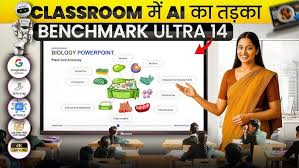
Digital Board / Interactive Flat Panel (MOST IMPORTANT)
Digital Board kya hota hai?
Digital Board ek touch screen smart board hota hai jisme:
- Aap likh sakte ho
- PDF, PPT, Video chala sakte ho
- Online & Offline dono padhai kar sakte ho
Online Teaching ke liye Digital Board kyun zaroori hai?
✔ Real classroom feel
✔ Writing clear dikhti hai
✔ Recording easy hoti hai
✔ Students engagement high hota hai
Best Digital Board Size for Online Class
- 65 inch – Small room
- 75 inch – Coaching & Online class (Most Popular)
- 86 inch – Studio / Large batch
Teachers ke liye popular options:
- Benchmark Sigma AI
- Benchmark Maxpro Ultra
- Maxhub Interactive Panel
Camera – Online Class ka Face
Camera kyun important hai?
Aapka face + board + explanation camera se hi students tak jata hai.
Online Class ke liye Camera Types:
- Webcam (Beginner)
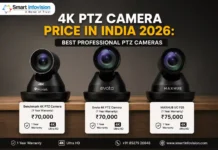
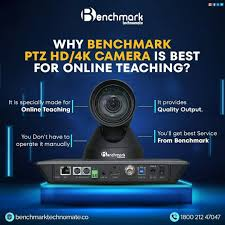
- PTZ Camera (Professional)
- DSLR (Advanced)
Best Camera Recommendation:
✔ 4K PTZ Camera
- Remote control
- Auto zoom
- Board + teacher dono capture karta hai
Microphone – Clear Voice ke liye
Agar audio clear nahi hai to best content bhi waste ho jata hai.
Mic Types:
- Collar Mic (Wired)
- Wireless Mic
- Handheld Mic
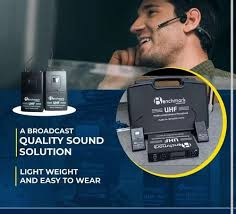
Best Mic for Teachers:
✔ Wireless Collar Mic
✔ Noise free
✔ Hands free teaching
Brands teachers use karte hain:
- Sennheiser
- Benchmark
- Boya (budget)
Lighting Setup – Professional Look ke liye
Lighting ke bina:
Face dark dikhega
Board reflection aayega
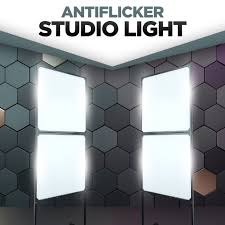
Best Lighting Setup:
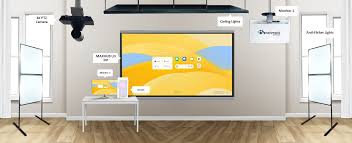
- 2×2 Ceiling Lights
- Softbox Light
- Ring Light (backup)
Online teaching ke liye white light best hoti hai.
Laptop / Computer / Server
Digital board ke sath:
- Laptop optional hota hai
- Recording & OBS ke liye useful
Minimum Configuration:
- i5 Processor
- 8GB RAM
- SSD preferred
Internet Connection – Backbone of Online Class
Recommended Speed:
- Minimum: 20 Mbps
- Ideal: 50 Mbps+
Wired broadband zyada stable hota hai.
Teaching Software / Apps
Online class ke liye commonly used software:
- Zoom
- Google Meet
- OBS Studio
- Digital Board built-in software
Mounting Accessories
- Wall Mount
- Ceiling Mount
- Trolley Stand
Coaching & rented space ke liye Trolley Stand best hota hai.
Background / Classroom Setup
- Plain wall
- Branding background
- Green screen (optional)
Professional setup me clean background sabse best hota hai.
Power Backup
Online class ke beech light chali gayi to:
Class break
Students complaint
Solution:
✔ UPS
✔ Inverter
Online Class Setup Cost (Approx)
| Setup Type | Cost Range |
|---|---|
| Mobile + Basic | ₹5,000 – ₹10,000 |
| Laptop + Camera | ₹25,000 – ₹40,000 |
| Digital Board Setup | ₹1.2 – ₹2.5 Lakh |
| Full Studio Setup | ₹2 – ₹4 Lakh |
EMI option bhi available hota hai.
Teachers jo Common Mistakes karte hain
Sirf mobile se class
Cheap mic use karna
Lighting ignore karna
Internet backup na rakhna
Digital Board ke sath Online Class ka Advantage
✔ Better results
✔ Student retention high
✔ Recording easy
✔ Brand value grow hoti hai
FAQ – People Also Ask
Q1. Online class ke liye minimum equipment kya chahiye?
Mobile/Laptop, Mic aur Internet se class start ho sakti hai, lekin professional teaching ke liye Digital Board best hota hai.
Q2. Online teaching ke liye best digital board kaunsa hai?
Benchmark Sigma AI aur Maxpro Ultra teachers ke liye best digital board hote hain.
Q3. Online class ke liye camera kaunsa best rahta hai?
4K PTZ Camera online teaching ke liye sabse best option hai.
Q4. Kya bina studio ke online class le sakte hain?
Haan, lekin studio setup se quality aur engagement dono improve hota hai.
Q5. Online teaching setup EMI par mil jata hai?
Haan, Digital Board aur complete setup EMI par available hota hai.
Q6. Online class ke liye sound proofing zaroori hai?
Agar noise zyada ho to sound proofing recommended hoti hai.
Q7. Offline coaching ko online kaise convert kare?
Digital Board, Camera, Mic aur proper lighting se offline coaching online shift ho jati hai.
Q8. Online class ke liye kaunsa mic best hai?
Wireless collar mic teachers ke liye best choice hota hai.
Conclusion
Agar aap serious online teaching karna chahte ho, to sirf content hi nahi balki right equipment bhi zaroori hai.
Digital Board + Camera + Mic + Lighting
= Successful Online Class