आज online education सिर्फ मोबाइल कैमरे के सामने बैठकर पढ़ाने तक सीमित नहीं रह गई है। Students अब clear video, साफ आवाज़, readable digital board, smooth live classes और professional presentation की उम्मीद करते हैं। यही कारण है कि 2026 में एक Professional Online Teaching Studio Setup किसी educator के लिए केवल technology upgrade नहीं, बल्कि teaching quality, student experience और digital brand building का महत्वपूर्ण हिस्सा बन चुका है।
अगर आपने Maths By Ramesh Sir जैसे education-focused YouTube channels या online teaching formats को देखा है, तो एक बात समझ आती है—Mathematics जैसे visual subject को online पढ़ाने में सिर्फ subject knowledge पर्याप्त नहीं है। Formula, graph, equation और step-by-step solution student को उतनी ही clarity से दिखाई देना चाहिए जितना traditional classroom के board पर दिखाई देता है।
इसी जरूरत को ध्यान में रखते हुए इस guide में हम समझेंगे कि 2026 में एक modern online teaching studio setup कैसा होना चाहिए, उसमें Digital Board, Interactive Flat Panel, 4K PTZ Camera, wireless microphone, lighting, computer, LMS और recording ecosystem की क्या भूमिका है और educators अपने लिए सही setup कैसे चुन सकते हैं।
2026 में Education Market इतनी तेजी से क्यों बदल रहा है?
कुछ साल पहले तक coaching का मतलब था—एक physical classroom, whiteboard, marker और सामने बैठे students।
अब वही teacher एक साथ कई जगह मौजूद हो सकता है।
वह classroom में students को पढ़ा सकता है, उसी lecture को online students तक live पहुँचा सकता है, session record कर सकता है, YouTube पर concept video upload कर सकता है और उसी content को LMS या learning app में course के रूप में इस्तेमाल कर सकता है।
यानी एक lecture अब केवल एक classroom तक सीमित नहीं रहता।
यही Hybrid Education Model की सबसे बड़ी ताकत है।
Schools, colleges, coaching institutes और individual educators के लिए इसका मतलब है कि teaching infrastructure को भी बदलना होगा।
सिर्फ webcam और laptop से शुरुआत संभव है, लेकिन जैसे-जैसे audience बढ़ती है, professional presentation की जरूरत बढ़ती जाती है।
इसलिए आज educators निम्न technologies की ओर बढ़ रहे हैं:
- Interactive Flat Panel
- Digital Teaching Board
- 4K PTZ Camera
- AI Auto-Tracking Camera
- Wireless Microphone
- Anti-Flicker Studio Lighting
- OBS/Streaming Setup
- LMS Integration
- Live Monitoring Screen
- Dedicated Teaching Computer
- Acoustic Treatment
- Hybrid Classroom Technology
इन सभी components का सही combination एक ordinary classroom को professional digital teaching studio में बदल सकता है।
Maths By Ramesh Sir Studio Setup से Educators क्या सीख सकते हैं?
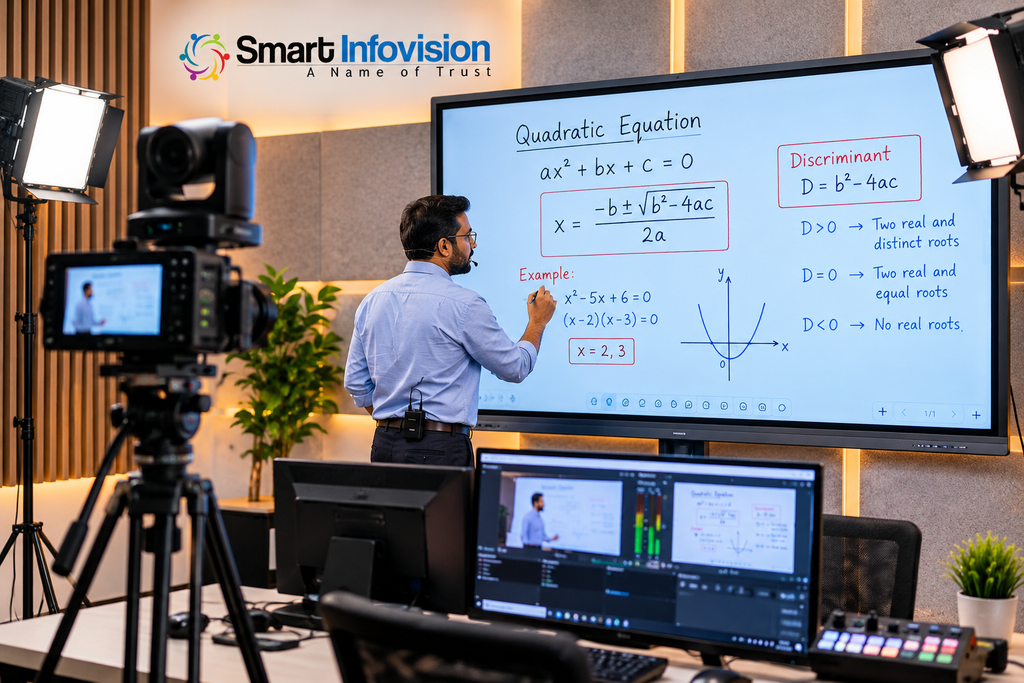
Mathematics एक ऐसा subject है जिसमें visual explanation बहुत महत्वपूर्ण है।
मान लीजिए teacher Quadratic Equation समझा रहे हैं।
अगर equation board पर साफ नहीं दिख रही, handwriting pixelated है या camera बार-बार focus खो रहा है, तो student concept समझने की जगह screen देखने में परेशान रहेगा।
इसी तरह teacher ने शानदार explanation दिया लेकिन microphone में background noise आ रही है, तो पूरा learning experience कमजोर हो जाता है।
इसलिए एक professional mathematics teaching setup में चार चीजें सबसे महत्वपूर्ण हैं:
Visual clarity + Writing experience + Audio clarity + Recording stability
यहीं से professional studio planning शुरू होती है।
Problem Analysis: Online Teachers को सबसे ज्यादा परेशानी कहाँ आती है?
बहुत से educators studio बनाते समय सबसे पहले camera खरीद लेते हैं।
लेकिन camera अकेला studio नहीं बनाता।
एक सामान्य teaching setup में problems कुछ इस तरह दिखाई देती हैं:
Camera अच्छा है लेकिन lighting खराब है।
Digital board अच्छा है लेकिन camera angle गलत है।
Mic महंगा है लेकिन room echo बहुत ज्यादा है।
Internet तेज है लेकिन computer streaming load handle नहीं कर रहा।
Board बड़ा है लेकिन teacher frame से बाहर जा रहा है।
Recorded video अच्छा है लेकिन live class में lag है।
यही वजह है कि equipment अलग-अलग खरीदने की बजाय पूरा workflow समझना जरूरी है।
एक teaching studio को ecosystem की तरह देखना चाहिए।
Traditional Teaching क्यों बदल रही है?
Traditional classroom खत्म नहीं हो रहा। वह technology के साथ evolve हो रहा है।
आज एक teacher physical classroom और digital classroom दोनों को combine कर सकता है।
उदाहरण के लिए:
Teacher सामने मौजूद students को Digital Board पर पढ़ाता है।
उसी समय PTZ Camera teacher और board को capture करता है।
Microphone teacher की voice online students तक भेजता है।
Live session Zoom, Google Meet या किसी LMS पर चलता है।
Lecture simultaneously record भी हो सकता है।
बाद में वही recording course library या YouTube पर इस्तेमाल की जा सकती है।
इसे ही broadly Hybrid Teaching Setup कहा जाता है।
Technology Gap: महंगा Equipment खरीदना ही Solution नहीं है
Teaching studios में एक common mistake होती है—specifications देखकर equipment खरीद लेना।
लेकिन specification और actual teaching requirement अलग चीजें हैं।
उदाहरण के लिए 4K camera खरीदना आसान है।
लेकिन सवाल यह होना चाहिए:
क्या camera का field of view board को cover करेगा?
क्या teacher movement track होगा?
क्या board की लिखावट overexposed तो नहीं होगी?
क्या lighting के कारण digital panel पर reflection आएगा?
क्या microphone teacher के board की तरफ मुड़ने पर भी clear voice capture करेगा?
क्या computer 1080p या 4K recording smoothly कर सकता है?
Professional studio planning इन सवालों का जवाब पहले देती है और products बाद में select करती है।
Solution: Complete Online Teaching Studio Ecosystem
एक balanced professional studio को broadly इन layers में समझा जा सकता है:
Layer 1 – Teaching Interface
Interactive Flat Panel या Digital Board
Layer 2 – Video Capture
PTZ Camera, AI Camera या professional webcam
Layer 3 – Audio Capture
Wireless microphone, lapel microphone या studio microphone
Layer 4 – Lighting
Anti-flicker LED lights, soft lights या studio panels
Layer 5 – Processing
PC, OPS या workstation
Layer 6 – Streaming & Recording
OBS, Zoom, Google Meet, Microsoft Teams या अन्य teaching software
Layer 7 – Distribution
YouTube, LMS, mobile app या course platform
जब ये सभी components properly integrate होते हैं तभी professional workflow बनता है।
Smart Infovision Approach: Product नहीं, पूरा Workflow
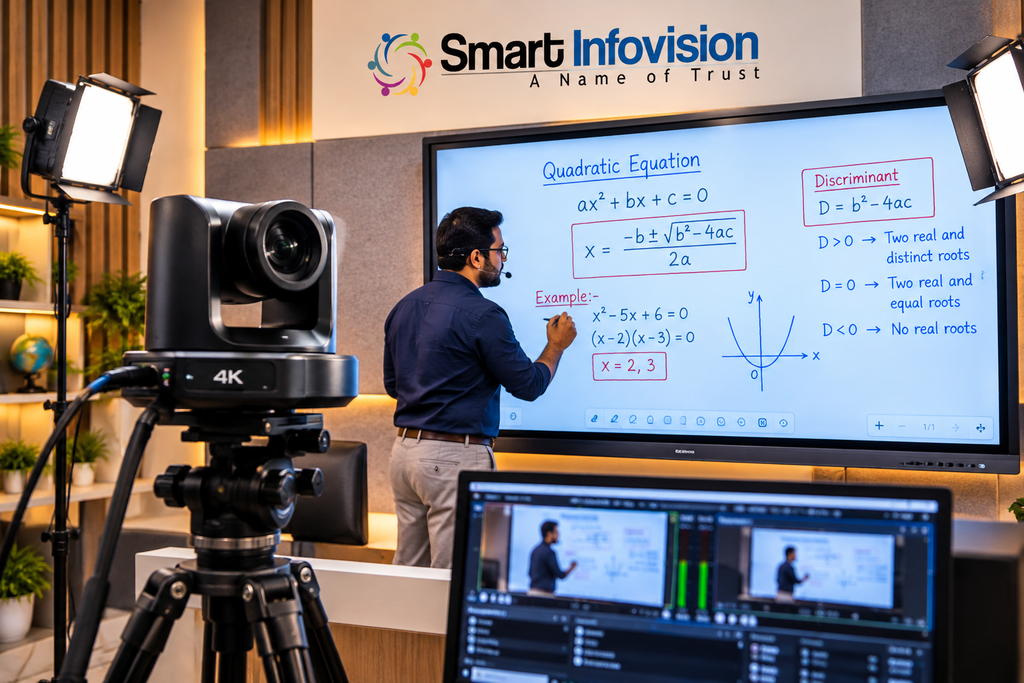
Smart Infovision की official information के अनुसार कंपनी teaching, recording और content-creation studios के लिए Digital Boards, cameras, audio, lighting और complete studio solutions उपलब्ध कराती है।
इसका practical advantage यह है कि educator को अलग-अलग vendors से camera, board, mic और installation manage करने की जरूरत कम हो सकती है।
Professional setup में planning का सही क्रम होना चाहिए:
Requirement → Room Assessment → Equipment Selection → Installation → Calibration → Training → Support
यही approach schools और coaching institutes के लिए विशेष रूप से उपयोगी है क्योंकि उनके setup को एक teacher नहीं बल्कि कई faculty members इस्तेमाल कर सकते हैं।
बीच में CTA: अपना Studio Equipment खरीदने से पहले Live Demo देखें
अगर आप teacher, coaching institute, school, college, YouTube educator या course creator हैं, तो सिर्फ specifications देखकर Digital Board या Studio Setup final न करें।
पहले यह देखें कि आपकी classroom size, teaching style, budget, recording requirement और online audience के लिए कौन-सा combination सही रहेगा।
Smart Infovision से Professional Studio Consultation या Live Demo लेकर Digital Board, Camera, Mic और Lighting को real teaching environment में compare करें।
इससे गलत equipment combination पर पैसा खर्च करने का risk कम किया जा सकता है।
Experience Center क्यों महत्वपूर्ण है?
Digital teaching equipment ऐसा product नहीं है जिसे केवल specification sheet देखकर आसानी से judge किया जा सके।
Interactive Flat Panel खरीदते समय educator को खुद check करना चाहिए:
Writing latency कैसी है?
Stylus response natural है या नहीं?
Display glare कितना है?
Text दूर से readable है?
Camera board को कैसे capture करता है?
Mic की real-world clarity कैसी है?
Software interface comfortable है?
Smart Infovision की current official branch information 14 Experience Centers दिखाती है, जहाँ Interactive Flat Panels, Digital Boards और teaching-studio equipment के live demos उपलब्ध होने की जानकारी दी गई है।
इस तरह का hands-on demo educator को purchase से पहले वास्तविक workflow समझने में मदद कर सकता है।
Product Ecosystem: एक Professional Teaching Studio में क्या-क्या चाहिए?
अब सबसे महत्वपूर्ण हिस्सा।
अगर आप Maths By Ramesh Sir जैसे structured educational content format से inspiration लेकर अपना professional teaching studio बनाना चाहते हैं, तो equipment को priority के हिसाब से समझिए।
1. Interactive Flat Panel – Modern Teaching Studio का Centrepiece
Traditional whiteboard पर लिखना आसान है, लेकिन online teaching में उसे professionally capture करना मुश्किल हो सकता है।
Interactive Flat Panel इस समस्या को काफी हद तक solve कर सकता है।
एक modern IFP पर teacher:
- लिख सकता है
- diagrams बना सकता है
- PDF खोल सकता है
- presentation चला सकता है
- browser इस्तेमाल कर सकता है
- educational content display कर सकता है
- screen annotate कर सकता है
- lessons record कर सकता है
Maths के लिए यह विशेष रूप से useful है।
Teacher equation लिखते समय अलग-अलग steps explain कर सकता है और जरूरत पड़ने पर previous solution पर वापस जा सकता है।
किस size का Digital Board सही है?
यह room और camera framing पर depend करता है।
Common professional sizes में:
65-inch: छोटे classroom या compact studio के लिए।
75-inch: coaching और professional teaching studio के लिए balanced option।
86-inch: बड़े classroom, institution और larger viewing environment के लिए।
सिर्फ बड़ा panel खरीदना हमेशा बेहतर नहीं होता। Camera distance, teacher height, room dimensions और viewing distance भी consider करें।
2. Digital Board for Mathematics Teaching
Mathematics पढ़ाते समय Digital Board का फायदा सिर्फ handwriting तक सीमित नहीं है।
Teacher geometry diagrams save कर सकता है।
Graph को zoom कर सकता है।
Previous equation duplicate कर सकता है।
Different teaching resources तुरंत open कर सकता है।
PDF question paper पर directly solve कर सकता है।
Recorded lecture में student को clean digital output मिलता है।
यही कारण है कि Digital Board online maths educators के लिए एक core teaching tool बन सकता है।
3. 4K PTZ Camera – Static Webcam से आगे
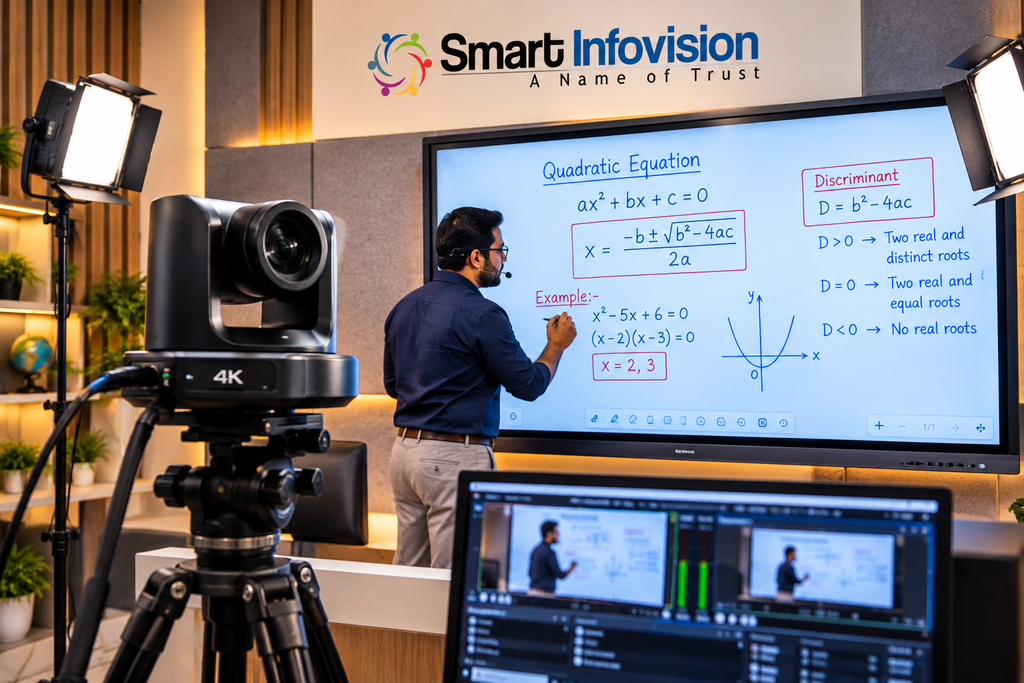
PTZ का अर्थ है:
Pan – Tilt – Zoom
ऐसा camera remotely अलग-अलग directions में move और zoom कर सकता है।
Professional teaching studio में इसका बड़ा फायदा तब मिलता है जब teacher board के अलग-अलग हिस्सों में move करता है।
Fixed webcam में teacher frame से बाहर जा सकता है।
PTZ setup में camera positioning को teaching area के अनुसार optimize किया जा सकता है।
कुछ professional cameras में auto-framing या AI tracking जैसी capabilities भी मिलती हैं।
क्या हर Teacher को 4K Camera चाहिए?
जरूरी नहीं।
अगर आप छोटे home setup से live tuition शुरू कर रहे हैं तो अच्छी quality webcam पर्याप्त हो सकती है।
लेकिन अगर आपका लक्ष्य है:
- YouTube lectures
- Paid recorded courses
- Professional coaching studio
- Large Digital Board
- Hybrid classroom
- Long-form educational content
तो PTZ camera ज्यादा flexible solution हो सकता है।
4. AI Camera और Auto Tracking
2026 के teaching studio में AI camera का role तेजी से बढ़ रहा है।
Teacher traditional camera operator के बिना classroom में move कर सकता है।
AI-enabled tracking systems presenter movement के अनुसार framing adjust करने में मदद कर सकते हैं।
यह particularly useful है:
- Mathematics
- Physics
- Chemistry
- Competitive exam classes
- Corporate training
- Hybrid lectures
लेकिन auto tracking को blindly enable नहीं करना चाहिए।
अगर teacher board के आसपास बहुत तेजी से move करता है तो aggressive tracking distracting हो सकती है।
इसलिए studio installation के बाद camera presets और tracking sensitivity को actual teaching style के अनुसार configure करना बेहतर है।
5. Microphone: Students खराब Video सह सकते हैं, खराब Audio नहीं
Online teaching में audio को अक्सर underestimate किया जाता है।
लेकिन student lecture को mainly सुनकर समझता है।
अगर voice में echo, hiss, clipping या background noise है तो अच्छे visual का फायदा कम हो जाता है।
Teaching setup में commonly इस्तेमाल किए जाने वाले options हैं:
Wireless Collar Microphone
Teacher freely move कर सकता है।
Board teaching के लिए convenient।
Lapel Microphone
Compact और voice-focused solution।
USB Microphone
Desk-based teaching या recorded lectures के लिए।
Podcast/Studio Microphone
Voice-over, podcast या stationary educational content के लिए useful।
Maths teacher जो लगातार board के सामने move करता है, उसके लिए wireless solution अक्सर ज्यादा practical होता है।
6. Studio Lighting – Camera से पहले Light समझिए
कई educators नया camera खरीदते हैं क्योंकि video dark दिख रहा होता है।
लेकिन कई बार problem camera नहीं, lighting होती है।
Professional teaching lighting का लक्ष्य dramatic cinematic look बनाना नहीं है।
लक्ष्य है:
Teacher clearly visible हो।
Digital Board readable रहे।
Face पर harsh shadow न हो।
Board पर unwanted reflection कम हो।
Video flicker न करे।
इसलिए teaching studios में anti-flicker LED lighting महत्वपूर्ण हो सकती है।
Lighting placement Digital Board के ठीक सामने करने से glare पैदा हो सकता है।
Lights को angle पर position करना ज्यादा effective हो सकता है।
YouTube Video Placement 1
Suggested Embed: Maths By Ramesh Sir का ऐसा YouTube lecture embed करें जिसमें teacher + board + camera framing साफ दिखाई दे।
इस video के नीचे 100–150 शब्दों का contextual paragraph रखें:
“ऊपर दिए गए lecture को देखते समय केवल teaching content पर नहीं, presentation workflow पर भी ध्यान दें। Board visibility, teacher positioning, audio consistency और camera framing जैसे factors online student experience को प्रभावित करते हैं।”
इससे page पर video सिर्फ decoration नहीं रहेगा बल्कि topical context भी बनाएगा।
7. Computer, OPS और Processing Power
Digital Board और camera खरीदने के बाद processing system ignore नहीं करना चाहिए।
अगर educator simultaneously:
- Digital Board चला रहा है
- Camera capture कर रहा है
- OBS चला रहा है
- Live stream कर रहा है
- Recording कर रहा है
- Browser tabs open हैं
- Presentation चला रहा है
तो system पर considerable workload आता है।
Interactive Flat Panels के साथ OPS computer option available हो सकता है।
दूसरा option dedicated desktop/workstation है।
किसी भी system को खरीदने से पहले workflow-based requirements determine करना ज्यादा सही है बजाय केवल processor generation देखने के।
8. Live Monitoring Screen
Teacher को पता होना चाहिए कि online students क्या देख रहे हैं।
इसीलिए professional studio में monitoring screen उपयोगी होती है।
इस पर teacher देख सकता है:
Live comments
Camera output
Presentation preview
Streaming status
Recording status
Online student interaction
इससे teacher को बार-बार main Digital Board छोड़कर computer के पास नहीं जाना पड़ता।
9. LMS Integration – Studio तभी Valuable है जब Content Students तक पहुँचे
Hardware content create करता है।
LMS उसे organize करता है।
Learning Management System के जरिए institute:
Recorded lectures organize कर सकता है।
Courses बना सकता है।
Assignments दे सकता है।
Tests conduct कर सकता है।
Student progress manage कर सकता है।
Study material distribute कर सकता है।
इसलिए long-term online education strategy में LMS को studio planning से अलग नहीं देखना चाहिए।
10. OBS और Live Streaming
OBS Studio जैसे tools educators को camera, screen, presentation और अन्य sources को combine करने में मदद कर सकते हैं।
उदाहरण:
Scene 1 – Teacher + Digital Board
Scene 2 – Full Board
Scene 3 – Teacher Camera
Scene 4 – Question Paper
Scene 5 – Presentation
एक professional online class में इन scenes के बीच controlled switching content को अधिक structured बना सकती है।
Hybrid Classroom: Offline + Online Students एक साथ
Hybrid classroom का basic idea simple है:
Teacher एक बार पढ़ाए, लेकिन lecture physical और online दोनों audiences तक पहुँचे।
इस setup में:
Interactive Flat Panel teaching interface बनता है।
Camera teacher को capture करता है।
Microphone audio capture करता है।
Computer streaming manage करता है।
Display/monitor online students दिखाता है।
LMS class material organize करता है।
यह model coaching institutes के लिए खास तौर पर useful हो सकता है।
एक faculty की teaching capacity physical classroom की seats तक सीमित नहीं रहती।
Smart Infovision Complete Studio Setup का Practical Advantage
एक studio की quality individual product से कम और integration से ज्यादा तय होती है।
Smart Infovision की official studio information के अनुसार उसके studio solutions में अलग-अलग configurations के आधार पर Interactive Flat Panel, cameras, microphones, lighting, installation और training शामिल हो सकते हैं।
Educator के लिए इसका practical benefit है कि setup को एक complete system की तरह plan किया जा सकता है।
यानी सवाल सिर्फ:
“कौन सा camera खरीदें?”
नहीं रहता।
सही सवाल बनता है:
“मेरी teaching requirement के लिए पूरा workflow क्या होना चाहिए?”
बीच में CTA: अपना Custom Online Teaching Studio Plan करें
अगर आप:
Maths teacher हैं,
YouTube educator हैं,
coaching institute चला रहे हैं,
school/college upgrade कर रहे हैं,
paid online course launch करना चाहते हैं,
या hybrid classroom शुरू करना चाहते हैं,
तो पहले room और workflow assessment कराएँ।
Smart Infovision के Experience Center में Digital Board, PTZ Camera, Microphone और complete teaching setup का live demo देखकर अपने budget के अनुसार configuration compare करें।
Hardware खरीदने से पहले practical demonstration कई गलत purchasing decisions से बचा सकता है।
Online Teaching Studio Setup Budget कैसे Plan करें?
हर teacher को लाखों रुपये से शुरुआत करने की जरूरत नहीं है।
Studio को stages में build किया जा सकता है।
Starter Setup
Suitable for:
Individual teacher
Home tuition
Beginning YouTube educator
Core requirement:
Laptop
Webcam
Wireless mic
Basic lighting
Writing tablet या basic display
Growing Educator Setup
Suitable for:
Regular YouTube classes
Online batches
Small coaching institutes
Core requirement:
Better camera
Professional wireless microphone
Multiple lights
Digital teaching display
Dedicated computer
Professional Teaching Studio
Suitable for:
Established educators
Coaching institutes
Schools
EdTech businesses
Core requirement:
Interactive Flat Panel
PTZ camera
Professional audio
Anti-flicker lighting
Workstation/OPS
Monitoring screen
Acoustic improvement
LMS/streaming integration
Institutional Hybrid Setup
Suitable for:
Schools
Colleges
Universities
Large coaching networks
यहाँ focus scalability, centralized content production, multiple classrooms और faculty training पर होना चाहिए।
Branding: Teacher का Studio उसकी Digital Identity भी है
Online education में student केवल teacher नहीं देखता।
वह पूरा frame देखता है।
Background.
Lighting.
Board.
Logo.
Colors.
Audio.
Presentation.
Thumbnail.
इसलिए studio branding को ignore नहीं करना चाहिए।
लेकिन branding का मतलब हर जगह logo लगाना भी नहीं है।
Professional education studio में subtle branding बेहतर काम करती है।
उदाहरण:
Clean background
Institute logo
Consistent typography
Brand colors
Professional board templates
Intro/outro
Lower-third graphics
इनसे educational content recognizable बनता है।
YouTube Video Placement 2
यहाँ Maths By Ramesh Sir का एक problem-solving या concept lecture embed किया जा सकता है।
Video embed के ऊपर H3 रखें:
Professional Maths Lecture में Board Visibility क्यों महत्वपूर्ण है?
Embed के बाद short analysis रखें जिसमें board readability, equation visibility, teacher movement और audio clarity की बात की जाए।
Video का exact title वही रखें जो YouTube पर officially मौजूद हो। गलत या rewritten title embed schema में इस्तेमाल न करें।
AI Teaching 2026: Teacher को Replace नहीं, Assist करने वाला Layer
AI का education में role तेजी से बढ़ रहा है।
लेकिन AI teaching का अर्थ सिर्फ AI-generated video नहीं है।
Professional educator AI का इस्तेमाल कर सकता है:
Lesson planning
Quiz generation
Question categorization
Lecture transcription
Subtitle generation
Content summarization
Student FAQ support
Performance analysis
Personalized practice
लेकिन AI-generated educational information को teacher review करना जरूरी है।
Especially mathematics और competitive examinations में गलत formula, answer या explanation student को नुकसान पहुँचा सकती है।
इसलिए best model है:
Teacher Expertise + AI Assistance + Human Verification
Online Teaching के लिए Internet Setup
एक expensive camera भी बेकार है अगर live class बार-बार disconnect हो रही है।
इसलिए stable internet studio infrastructure का हिस्सा है।
Professional setup में consider करें:
Primary broadband connection
5 GHz Wi-Fi या wired Ethernet
Backup internet connection
UPS/power backup
Router placement
Upload speed
Live streaming में सिर्फ download speed नहीं, upload stability महत्वपूर्ण है।
Acoustic Treatment क्यों जरूरी हो सकता है?
Microphone सिर्फ आपकी voice नहीं सुनता।
वह room भी सुनता है।
Empty room में hard walls, floor और ceiling आवाज़ reflect कर सकते हैं।
इससे echo पैदा होती है।
Basic acoustic improvement में:
Curtains
Acoustic panels
Soft furnishing
Carpet
Strategic wall treatment
का उपयोग किया जा सकता है।
हर room को expensive soundproof studio बनाने की जरूरत नहीं है।
पहले echo problem identify करें।
Future Trends: 2026 के बाद Online Teaching कहाँ जा रही है?
आने वाले वर्षों में online teaching और अधिक intelligent और integrated होने की संभावना है।
हम कुछ clear trends देख सकते हैं:
AI-Assisted Classroom
AI teacher के लिए content organization और student support आसान कर सकता है।
Auto-Tracking Video
Camera operator के बिना teacher movement follow करना आसान होगा।
Hybrid-First Infrastructure
Classroom शुरू से offline + online दोनों audiences के लिए design किए जाएँगे।
Interactive Content
Static slides की जगह interactive diagrams और real-time annotations बढ़ेंगे।
Automated Content Repurposing
एक long lecture से:
Short videos
Notes
Quiz
Revision material
Social content
बनाना आसान होता जाएगा।
Personalized Learning
Student performance के आधार पर learning paths अधिक personalized हो सकते हैं।
लेकिन technology के बीच teacher की सबसे बड़ी ताकत वही रहेगी—concept को सरल भाषा में समझाने की क्षमता।
Smart Infovision Experience Centers का फायदा
Professional Digital Board और Studio Setup में physical demonstration काफी useful हो सकता है।
Experience Center visit करते समय educator को सिर्फ salesperson की presentation नहीं सुननी चाहिए।
अपना actual workflow test करें।
Board पर Mathematics question solve करें।
Camera recording देखें।
Mic पहनकर room में move करें।
Board के अलग-अलग corners पर लिखें।
Lighting reflection check करें।
Recording file देखें।
YouTube-style framing test करें।
अगर possible हो तो अपने laptop या teaching material के साथ demo लें।
यही demo को practical बनाता है।
YouTube Video Placement 3
यहाँ Smart Infovision के official YouTube channel से Digital Board / Studio Installation / PTZ Camera Demo video embed करना बेहतर रहेगा।
Embed के आसपास keywords naturally इस्तेमाल करें:
online teaching studio setup, Digital Board for teachers, PTZ Camera for online classes, Interactive Flat Panel for coaching institutes.
लेकिन video के आसपास artificial keyword stuffing न करें।
Maths Teachers के लिए Ideal Studio Workflow
मान लीजिए सुबह 10 बजे Mathematics की live class है।
Teacher studio में आता है।
Digital Board पर lesson material open करता है।
Wireless mic connect होता है।
PTZ camera preset teaching position पर set है।
Lights on होती हैं।
OBS/streaming software lecture scene load करता है।
Class शुरू होती है।
Teacher Digital Board पर question solve करता है।
Online students live देख रहे हैं।
Lecture simultaneously record होता है।
Class खत्म होने के बाद recording edit होकर LMS और YouTube पर publish की जा सकती है।
यही एक efficient digital teaching workflow है।
Technology का उद्देश्य teacher को complicated बनाना नहीं, teaching को smooth बनाना होना चाहिए।
People Also Ask
Online teaching के लिए कौन सा Digital Board अच्छा है?
सही Digital Board का selection room size, budget, software requirement, writing experience और teaching style पर निर्भर करता है। 65-inch, 75-inch और 86-inch Interactive Flat Panels common options हैं।
Online teaching के लिए PTZ Camera जरूरी है?
हर teacher के लिए जरूरी नहीं। लेकिन बड़े board, teacher movement, professional recording और hybrid classroom में PTZ Camera ज्यादा flexibility दे सकता है।
Maths teacher के लिए Digital Board useful है?
हाँ। Mathematics में equations, graphs, geometry, PDFs और step-by-step problem solving के लिए Interactive Digital Board useful हो सकता है।
Online class के लिए कौन सा microphone इस्तेमाल करें?
Moving teachers के लिए wireless lapel/collar microphone practical हो सकता है। Desk-based recording में USB या studio microphone भी उपयोगी हो सकता है।
Teaching studio में lighting क्यों जरूरी है?
Lighting teacher visibility improve करती है, unwanted shadows कम करती है और camera output को बेहतर बनाने में मदद करती है।
FAQ – Maths By Ramesh Sir Studio Setup & Online Teaching Setup 2026
1. Maths By Ramesh Sir Studio Setup में कौन सा camera इस्तेमाल होता है?
उनके complete current equipment models की publicly verified list उपलब्ध न होने पर किसी specific model को उनका exact camera कहना उचित नहीं होगा। Professional maths teaching studios में PTZ, 4K या AI auto-tracking cameras उपयोगी options हो सकते हैं।
2. Professional Online Teaching Studio Setup की cost कितनी होती है?
Cost room size, Digital Board, camera, microphone, lighting, computer, acoustic treatment और installation पर निर्भर करती है। Basic setup और institutional hybrid studio की cost में बड़ा अंतर हो सकता है।
3. क्या Interactive Flat Panel YouTube teaching के लिए अच्छा है?
हाँ। Interactive Flat Panel पर teacher writing, annotation, PDFs, presentations और digital teaching resources इस्तेमाल कर सकता है। सही camera और lighting के साथ यह YouTube teaching के लिए effective solution हो सकता है।
4. क्या Digital Board के साथ camera जरूरी है?
अगर सिर्फ physical classroom में पढ़ाना है तो जरूरी नहीं। लेकिन live classes, recording, YouTube और hybrid teaching के लिए camera महत्वपूर्ण component है।
5. PTZ Camera और normal webcam में क्या अंतर है?
PTZ Camera pan, tilt और zoom control देता है। Professional models में presets, optical zoom या tracking जैसी additional capabilities भी हो सकती हैं। Webcam compact और economical होता है लेकिन large teaching area में flexibility कम हो सकती है।
6. Online Maths Classes के लिए सबसे महत्वपूर्ण equipment क्या है?
Clear Digital Board, reliable audio, suitable camera, proper lighting और stable internet core components हैं। इनमें से audio और board readability को विशेष priority देनी चाहिए।
7. क्या Smart Infovision studio installation करता है?
Smart Infovision की official information के अनुसार company Digital Boards, cameras, microphones, lighting और complete studio solutions के साथ professional installation, training और support उपलब्ध कराती है।
8. क्या studio खरीदने से पहले live demo लेना चाहिए?
हाँ। खासकर Interactive Flat Panel, camera framing, microphone और lighting को actual teaching environment में test करना useful होता है।
9. क्या एक ही studio से YouTube और live classes दोनों की जा सकती हैं?
सही configuration होने पर एक studio recording, live classes, YouTube content और hybrid teaching जैसे multiple workflows के लिए इस्तेमाल किया जा सकता है।
10. 2026 में teacher के लिए AI camera लेना जरूरी है?
जरूरी नहीं। AI tracking convenience दे सकती है, लेकिन equipment selection teaching style, room और budget के अनुसार होना चाहिए।
Conclusion: Great Teaching + Right Technology = Better Learning Experience
Maths By Ramesh Sir Studio Setup जैसे searches वास्तव में एक बड़े बदलाव की ओर इशारा करते हैं। Educators अब सिर्फ यह नहीं पूछ रहे कि online कैसे पढ़ाएँ। वे जानना चाहते हैं कि professional तरीके से online कैसे पढ़ाएँ।
और यही अंतर महत्वपूर्ण है।
एक अच्छा Online Teaching Studio Setup expensive gadgets का collection नहीं है।
यह एक carefully planned ecosystem है जिसमें Digital Board, Interactive Flat Panel, Camera, Microphone, Lighting, Computer, LMS, Internet और teaching workflow एक साथ काम करते हैं।
अगर आप 2026 में अपना teaching studio बना रहे हैं, तो camera या Digital Board खरीदने से शुरुआत न करें।
अपनी teaching requirement से शुरुआत करें।
आप किस subject को पढ़ाते हैं?
आपका room कितना बड़ा है?
Audience live है या recorded?
आप YouTube पर पढ़ाएँगे या LMS पर?
Teacher कितना move करता है?
कितने students हैं?
Budget कितना है?
इन सवालों के जवाब मिलने के बाद technology select करना आसान हो जाता है।
Smart Infovision जैसे complete studio-solution providers का सबसे practical फायदा यही हो सकता है कि educator Digital Board से लेकर camera, audio, lighting, installation और training तक पूरे workflow को एक integrated solution के रूप में evaluate कर सके।
अगर आपका लक्ष्य professional online teaching, YouTube education, hybrid classroom या scalable coaching ecosystem बनाना है, तो Maths By Ramesh Sir Studio Setup को केवल equipment list की तरह न देखें। इसे एक उदाहरण की तरह देखें कि modern educator को teaching quality और technology को साथ लेकर क्यों चलना चाहिए।
Final CTA – अपना Professional Teaching Studio Plan करें
क्या आप अपना Online Teaching Studio, Digital Classroom या Hybrid Coaching Setup शुरू करना चाहते हैं?
Equipment randomly खरीदने के बजाय पहले अपनी requirement के अनुसार complete setup plan करें।
Smart Infovision के nearest Experience Center पर Interactive Flat Panel, Digital Board, PTZ Camera, Microphone और Studio Lighting का live demo देखें और अपने room, subject तथा budget के अनुसार customized solution discuss करें।