Future of Learning: Ek Effective Hybrid Classroom Setup Ke Liye Kis-Kis Equipment Ki Zaroorat Hoti Hai?
New Delhi: Indian education system pichle kuch saalon mein tezi se badla hai. Aaj ka daur sirf traditional blackboards ya zoom meetings tak seemit nahi hai. Ab waqt hai “HyFlex” yaani hybrid learning ka, jahan aadhi class room mein baithti hai aur aadhi ghar se live padhti hai.
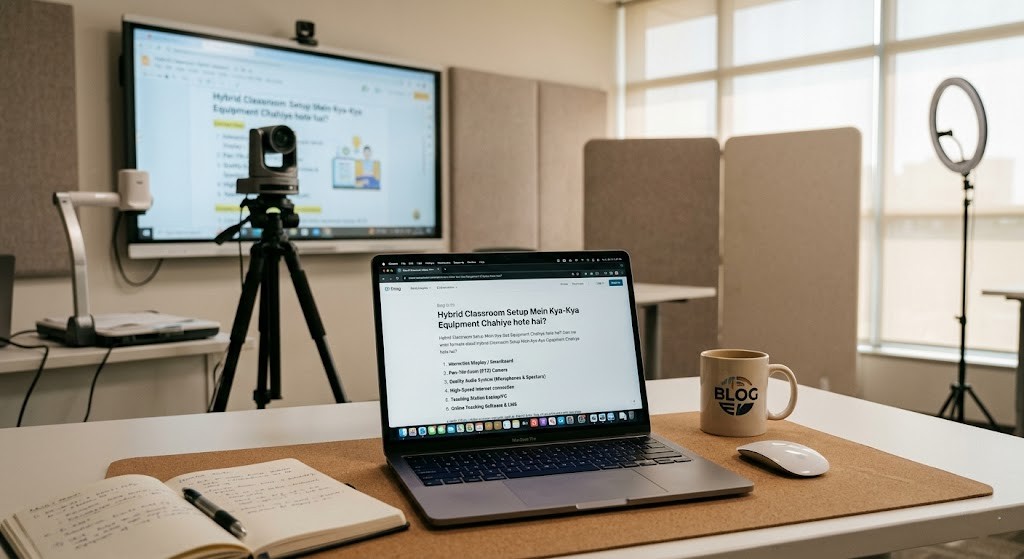
Ek professional Hybrid Classroom Setup taiyar karna koi mushkil kaam nahi hai, agar aapke paas sahi tech infrastructure ho. Agar aap ek school administrator hain, coaching institute chalate hain, ya ek independent educator hain, toh aapko ek aisa ecosystem banana hoga jahan offline aur online dono students ko barabar ka learning experience mile.
Is exhaustive guide mein hum baat karenge un saare essential equipments aur tech tools ki, jo ek high-performing Hybrid Classroom Setup ke liye non-negotiable hain.
1. The Interactive Hub: Digital Board for Teaching
Traditional whiteboards par jab light padti hai toh online baithe students ko glare (chamak) dikhaye deti hai. Iska permanent solution hai ek Interactive Flat Panel (IFP) ya Smart Board.
- Kyun Zaroori Hai?: Yeh ek bade 4K touch display jaisa hota hai jisme built-in Android ya Windows OS (OPS Mini PC ke zariye) hota hai.
- Key Features: Isme 20-point touch hota hai, yaani ek saath do log likh sakte hain. Saath hi isme anti-glare glass hota hai taaki class ke har kone se aur screen par saaf dikhe.
- Hybrid Benefit: Teacher jo bhi board par likhta hai, use direct screen share ke zariye remote students ke sath real-time mein share kiya ja sakta hai. Remote students bhi apne ghar se is board par annotate (likh) sakte hain.
2. Eyes of the Class: PTZ (Pan-Tilt-Zoom) Cameras
Ghar par baithe student ko aisa nahi lagna chahiye ki woh koi boring documentary dekh raha hai. Standard webcams ki ek fixed range hoti hai, isliye hybrid model mein PTZ Cameras ka istemal kiya jata hai.
- AI Auto-Tracking: Aaj kal ke modern PTZ cameras mein AI tracking hoti है. Jaise hi teacher board se desk ki taraf move karta hai, camera automatically unhe follow karta hai.
- Optical Zoom: Agar teacher board par koi chota diagram bana raha hai, toh bina resolution kharab kiye camera 10x ya 20x zoom kar sakta hai.
- Placement: Isko hamesha classroom ke back wall par ya ceiling par mount kiya jata hai taaki poori class aur teacher ka view ek saath mil sake.
3. Ears of the Class: Pro Audio System & Microphones
Ek baat hamesha yaad rakhiye—video quality agar thodi low ho toh chal jayegi, lekin agar audio kharab ho toh online student 5 minute mein class chor dega. Audio setup aapke Hybrid Classroom Setup ka sabse crucial hissa hai.
| Equipment Type | Kiske Liye Best Hai? | Main Purpose |
| Wireless Collar/Lavalier Mic | Mobile Teachers | Teacher bina kisi wire ke jhanjhat ke classroom mein ghoom kar padha sakte hain. |
| Ceiling Array Microphones | Discussion-Based Classes | Yeh pooray room ka sound capture karte hain taaki offline student ka sawal online student ko saaf sune. |
| Wall-Mounted Speakers | In-Class Students | Online baite students jab koi sawal poochein, toh classroom ke bachon ko saaf sunayi de. |
4. The Brain: Dedicated PC / OPS Module
Saare cameras, mics, aur interactive boards ko chalane ke liye ek solid computing device chahiye hoti hai.
- OPS (Open Pluggable Specification): Yeh ek mini-computer hota hai jo direct aapke Interactive Flat Panel ke peeche slot mein fit ho jata hai. Isse wires ka jhanjhat khatam ho jata hai.
- Specifications: Kam se kam Intel i5 core processor, 16GB RAM, aur SSD storage honi chahiye taaki Zoom, MS Teams, ya Google Meet chalate waqt system lag na kare.
5. Document Cameras (Visualizers)
Maths, Science, aur Arts ke teachers ke liye yeh ek bohot hi useful tool hai.
- Yeh Kya Karta Hai?: Yeh ek adjustable arm wala camera hota hai jise desk par rakha jata hai. Teacher iske neeche koi bhi textbook, handwritten notes, ya 3D science model rakh kar use direct digital board aur online stream par live dikha sakta hai.
- Fayda: Isse teacher ko baar-baar board par complex diagrams draw karne ki zaroorat nahi padti.
6. Network Infrastructure: Fast & Reliable Internet
Aap chahe lakhon ka equipment khareed lein, agar internet slow hai toh aapka Hybrid Classroom Setup fail ho jayega.
- Bandwidth Requirement: Ek smooth 1080p live streaming ke liye kam se kam 50-100 Mbps ki dedicated uploaded speed (Leased Line ya Fiber Broadband) honi chahiye.
- Wi-Fi 6/7 Routers: Classroom mein kayi devices ek saath connect hoti hain (Teacher ka laptop, smart board, CCTV, students ke tablets). Isliye enterprise-grade routers ka hona zaroori hai jo bina crash huye multiple connections handle kar sakein.
7. Power Backup & Lighting Setup
India mein power fluctuations aur power cuts bohot common hain. Sensitive digital boards aur computers ko voltage spike se bachane ke liye 1kVA se 2kVA ka Online UPS lagana non-negotiable hai.
Iske alawa, classroom ki lighting par dhyan dena zaroori hai. Agar room mein andhera hoga toh camera output clear nahi aayega. Teacher ke face par proper light padne ke liye professional LED studio panels ya softboxes ka setup lagaya jana chahiye.
Checklist Summary: Budgeting Your Setup
Ek basic se lekar advanced intelligent classroom setup karne ka kharcha hardware brands aur screen size par depend karta hai.
- Basic Setup: (Webcam + Wireless Mic + Standard Laptop + Normal Projector) — ₹50,000 to ₹80,000.
- Professional Hybrid Setup: (Interactive Flat Panel + 4K PTZ Camera + Professional Audio System + OPS PC) — ₹2,000,000 to ₹4,000,000.
Conclusion
Hybrid education ab temporary option nahi balki ek permanent feature ban chuka hai. Ek sahi Hybrid Classroom Setup na sirf aapke institute ki reach badhata hai, balki students ko ek futuristic learning experience bhi deta hai. Sahi hardware mein kiya gaya investment long-run mein aapke educational institution ko ek brand bana sakta hai.