Creating a professional teaching studio is not just a trend—it’s a necessity for educators, YouTubers, business coaches, and traders who want to deliver high-quality content. Whether you’re recording lectures, going live on YouTube, or conducting online coaching sessions, having a reliable and advanced teaching studio setup can build your brand, increase engagement, and boost income.
In this blog, we’ll walk you through everything you need to set up a modern teaching studio, including:
- Core equipment like interactive digital boards, 4K cameras, and servers
- Budget estimates
- Soundproofing, lighting, and studio environment
- Support and service availability across India
- Why Smart Infovision is the preferred partner for studio setup
Why Build a Teaching Studio?
Before we get into the equipment, let’s understand the benefits of a proper studio setup:
- Boosts credibility and professionalism
- Enables high-quality recordings without interruptions
- Allows you to go live confidently
- Helps build a personal brand identity
- Creates an ideal environment for students/viewers
- Increases monetization potential through better engagement
Core Equipment for a Teaching Studio
1. Digital Board (Benchmark Sigma AI A7 Pro)
Why it’s essential:
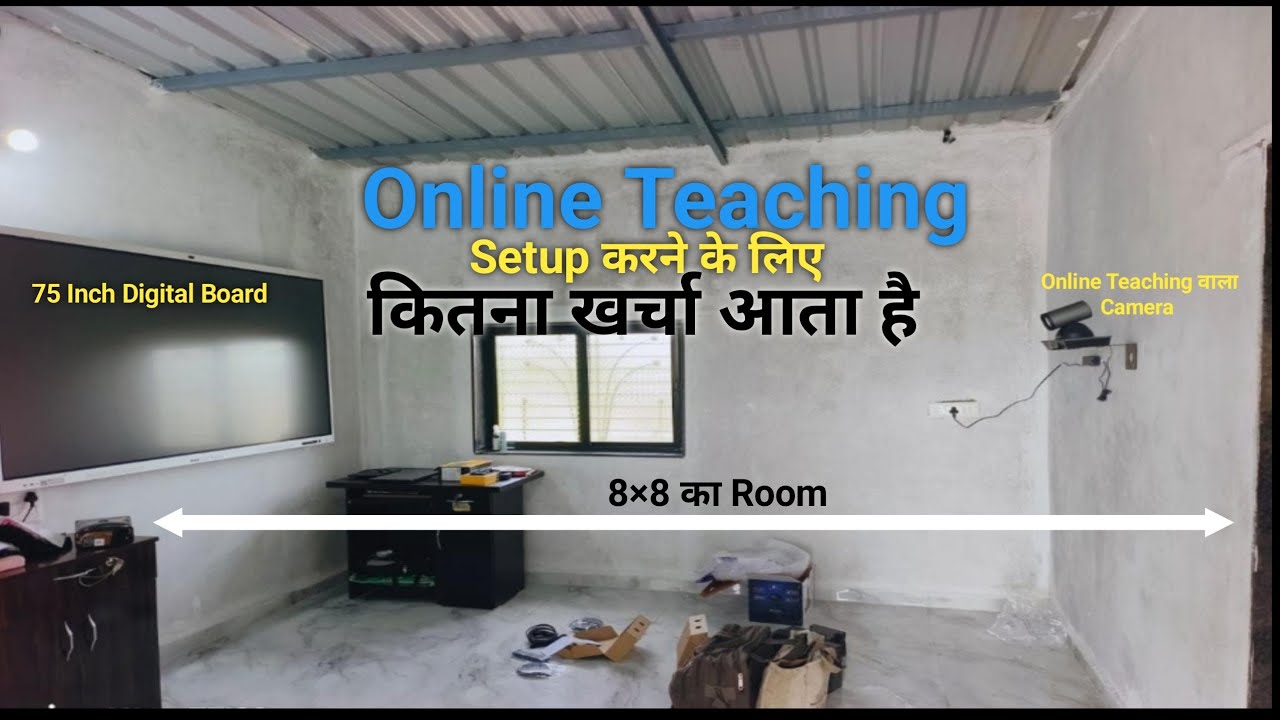
A digital board like the Benchmark Sigma AI A7 Pro 75” transforms any class into an interactive, AI-powered experience.
Features:
- Create PPTs, videos, quizzes
- Scan books & generate summaries, PDFs
- Zoom on PDFs without pixel loss
- CBSE/NCERT/State Board books pre-loaded
- 7 built-in AI assistants for teachers
- Comes with inbuilt mic, camera, NFC card, lock system
- Premium white design with Apple-like writing quality
Cost: ₹1,35,000 to ₹2,10,000
Warranty: Up to 7 years
2. Camera (Benchmark 4K PTC Camera)
Key Specs:
- 4K Resolution
- 12X Optical Zoom
- Gesture-based movement—no cameraman needed
- Frame-lock: No lag or drop during recording
Cost: Approx. ₹85,000
Best Distance from Board: 8 feet
3. Server (Computer System)
Recommended Specs:
- i5 or i7 Processor
- High RAM & SSD
- Capable of 2–8 hour recordings without heating or freezing
Cost: ₹60,000 (Benchmark-built servers available)
Lighting Setup
Proper lighting enhances your presence on camera.
Options:
- 2×2 Lights: ₹2,000 per unit
- Tube Lights: ₹700–₹800 each
- Ideal Quantity: 10 lights for a premium studio
Tip: Always close windows to prevent natural light interference.
Microphone
Recommended Brands: Sennheiser, Rode, Benchmark Blog Mic
Invest in a studio-grade mic if you’re serious about delivering high-quality audio. Avoid ultra-cheap microphones.
Monitors
- Quantity: 2
- Cost: ₹10,000 each
- Use: Multi-screen support for live/recording sessions
Acoustic Treatment
Why important?
- Prevents echo
- Minimizes outside noise
- Improves voice clarity and modulation
Options:
- Plain acoustic sheets
- Colorful panels
- Gypsum + glass wall finish
- Full carpet flooring for sound absorption
Acoustic treatment by Smart Infovision included in premium studio packages.
Software & Streaming Tools
Smart Infovision recommends pairing your setup with reliable software for:
- Live streaming (e.g., OBS Studio, vMix)
- Recording and editing (e.g., Camtasia, Filmora)
Studio Environment Matters
Even with a small room or tin roof, a well-equipped studio works wonders. But for optimal results:
- Soundproof the room
- Install lighting frames on ceilings
- Keep walls neat
- Install air conditioning (AC recommended for long sessions)
- Add carpeting to enhance sound absorption and aesthetics
Smart Infovision: Your Studio Setup Partner
Smart Infovision is not just a seller—they’re a complete solution provider. They offer:
- Full studio setup packages
- Custom acoustic and lighting design
- Pan-India service and support centers in 10+ cities: Pune, Lucknow, Patna, Ahmedabad, Jaipur, Bhagalpur, and more
- Indian-made Benchmark brand products
- Fast installation, training, and after-sales service
- Service app to raise support tickets easily
Popular Premium Studio Setup (₹4.9L to ₹5.4L):
- Benchmark Sigma AI A7 Pro 75″
- OPS System
- i7 Server
- 2 Monitors
- 2 Podcast Chairs
- 1.5 Ton AC
- Acoustic Treatment + Carpet
Who Is This Setup For?
This studio setup is perfect for:
- School Teachers
- Private Tutors
- Business Coaches
- YouTubers
- Traders (for trading screens)
- Colleges & Institutes
- Online Educators teaching any subject
Even if you’re in a remote location, Smart Infovision ensures setup and support reach your doorstep.
Is It Worth the Investment?
Absolutely!
This is not an expense; it’s a long-term investment in your:
- Brand image
- Credibility
- Income generation
- Content quality
- Digital presence
Smart Infovision customers report significant growth in student enrollment, YouTube subscribers, and revenue.
Ready to Set Up Your Studio?
Want a demo or need consultation?
Call: 8527926648
Website: www.smartinfovision.com
FAQs
Q1. Can I install this studio setup in a small room?
Yes. Even small, well-packed rooms can be optimized with acoustic treatment and lighting.
Q2. How long does setup take?
Most setups are completed within 2–4 working days.
Q3. What if I face technical issues later?
Smart Infovision offers local support across India and a dedicated support app.
Q4. Is the AI panel difficult to use?
No. It’s built for teachers and comes with training and 7 AI assistants.
Also Read –
Benchmark Sigma AI A7 Pro Digital Board– The Smartest Choice for Educators in 2025
From a Hut to a Million Hearts: The Inspiring Journey of Disha Online Classes
TEACHER से डिजिटल CEO तक: अपने ज्ञान को कमाई में बदलने के लिए PERFECT स्टूडियो SETUP